
 Updated : March 16, 2026
Get an AI-powered summary for this content:
Every missed call leads of loss of customers and loss of revenue. Yet many businesses struggle to manage growing call volumes. This is where “IVR” becomes essential. With the help of call routing and self-service, IVR can help businesses respond faster and reduce agent workload.
As per a report, service innovators are 4x more likely to invest in self-service technologies. This clearly shows how automation is becoming central to modern customer support. Fortunately, you don’t need a large budget. There are several free and open-source IVR software available.
This guide sheds light on the 10 top free IVR software available.
What is IVR Software and Why Does it Matter?
IVR (Interactive Voice Response) software guides the caller through a set of automated options. You’ve likely experienced it before, “Press 1 for sales, Press 2 for support.” As the call arrives, the system routes calls to the right team. IVR allows customers to solve their problems by themselves. IVR makes handling simple requests like account details or appointment confirmations easy.
Why does IVR matter?
- IVR saves time for both businesses and customers.
- Agents spend less time transferring calls.
- Customers reach the right help faster.
- It creates structure and improves response times.
- It ensures no call feels lost in the system.
DID YOU KNOW?
- The Interactive Voice Response (IVR) market was estimated at US $5.73 billion in 2025. It is anticipated to reach US $10.17 billion in 2035. This showcases a growth rate of 5.9%.
Free vs. Freemium vs. Free Trial: Know What You’re Getting
Not every “free” IVR solution means the same thing. While some software are completely free to use, others might have limited access. And for a few, “free” might simply mean they let you test the product for a short period. Knowing the difference is crucial. It can help you save on unnecessary or hidden costs later.
- “Free” software usually refers to open-source or fully free tools. However, they may require technical setup.
- “Freemium” software offers a basic version at no cost. But the catch with such software is that they might lock advanced features like analytics, integrations, or higher call limits behind paid plans.
- “Free trials” give you complete access to the software. But the access is allowed only for a limited time.
What is crucial is that you look beyond the temptation of the word “free”. You must check for your unique business requirements and whether the software provides them or not. The right option should support your current needs and must help you scale as well if needed in the future.
10 Best Free IVR Software for 2026
IVR software are crucial for your business. But it is also crucial to know which suits your business. Let’s thoroughly analyze the 10 best IVR software.
Free & Open Source IVR Software
1. Asterisk
Asterisk is an open-source telephony platform for building custom IVR systems. It allows businesses to create advanced call flows, automate routing, and integrate voice applications with SIP-based communication infrastructure.
Key Features
- Three-way Calling
- Interactive Voice Response (IVR)
- Direct Inward System Access
- Call Forward (On Busy & No Answer)
- Call Recording
Best For
- Developers and businesses that want full control over their IVR setup and have the technical resources to build and manage it.
Limitations
- Requires strong technical knowledge of Linux, SIP, and telephony configuration. Setup and maintenance can be time-consuming.
G2 Rating
2. FreeSWITCH
FreeSWITCH is a powerful open-source communication platform designed for building scalable voice and IVR applications. It supports advanced call routing, conferencing, and real-time communication features for complex telephony environments.
Features
- Call Groups
- Flexible CDR system
- FIFO (QUEUE)
- IVR
- Shared Line Appearance
Best For
- Enterprises or developers building large-scale voice applications that require high performance and flexibility.
Limitations
- Steeper learning curve and complex configuration. Requires dedicated infrastructure and technical expertise to manage.
G2 Rating
3. Ekiga
Ekiga is an open-source softphone and communication tool that supports SIP and VoIP calls. While primarily designed for voice and video communication, it can be used as part of a simple VoIP setup for small IVR deployments.
Key Features
Best For
- Individuals or small teams looking for a basic open-source VoIP client for communication systems.
Limitations
- Limited IVR capabilities and automation features compared to dedicated IVR platforms.
G2 Rating
4. MicroSIP
MicroSIP is a lightweight SIP-based softphone that enables users to make VoIP calls using SIP providers. It focuses on simplicity and low system resource usage, making it useful for basic VoIP communication environments.
Key Features
- SIP Compatibility
- High-quality Voice & Video Calling
- Call Transfering
- Call Conferencing
Best For
- Businesses or individuals who need a simple softphone to connect with SIP-based telephony systems.
Limitations
- Does not provide built-in IVR functionality and lacks advanced call management features.
G2 Rating
5. Verboice
Verboice is an open-source platform designed specifically for building interactive voice response applications. It allows organizations to create automated voice services that can collect information and interact with callers.
Key Features
- Visual IVR Builder
- Call Management
- Audio Support
- Data Collection
- Call Analytics
Best For
- Nonprofits, NGOs, and developers building community-based voice applications or automated outreach systems.
Limitations
- Requires technical setup and infrastructure management. Community support is limited compared to mainstream IVR platforms.
G2 Rating
6. Sonetel
Sonetel is a cloud-based business phone system that offers a free tier with basic IVR and call handling features. It allows businesses to set up virtual numbers and route calls through a simple cloud interface.
Key Features
Best For
- Small businesses looking for an easy-to-deploy IVR system without managing servers.
Limitations
- Free plan includes limited features and usage. Advanced capabilities and higher call volumes require paid upgrades.
G2 Rating
7. Bitrix24
Bitrix24 is a business management platform that includes CRM, communication tools, and a basic call center module. Its free plan allows teams to handle calls and create simple IVR-style routing through the platform.
Key Features
- CRM & Sales Automation
- Project & Task Management
- Internal Chat and Video Calls
- Workflow Automation
Best For
- Small teams that want IVR functionality combined with CRM and collaboration tools in one platform.
Limitations
- IVR capabilities are limited in the free plan, and advanced telephony features require paid plans.
G2 Rating
Paid IVR Software (Free Trial Available)
8. CallHippo
CallHippo is a cloud-based IVR service provider. Along with IVR, it also includes smart call routing and automated call handling features. It allows businesses to create multi-level IVR menus. This helps callers route calls to the right departments. CallHippo supports integrations with CRM tools and provides analytics to track call performance.
Advanced Features
Business Integrations
- Hubspot
- Zoho
- Salesforce
- Sugar CRM
- Microsoft Dynamics
Explore the Full List of Integrations.
Pricing
- Basic: $1 per user/Month
- Starter: $19 per user/Month
- Professional: $29 per user/Month (Popular)
- Ultimate: $45 per user/Month
G2 Rating
9. Genesys Cloud CX
Genesys Cloud CX is an enterprise-grade contact center platform. It offers advanced IVR capabilities along with AI-powered customer experience tools. It supports speech-enabled IVR, omnichannel routing, and automated workflows. This helps businesses manage inbound and outbound customer interactions efficiently.
Advanced Features
- Analytics and Reporting
- IVR
- Predictive Routing
- Virtual Agent
- Messaging Apps
Business Integrations
- Salesforce
- Microsoft Dynamics 365
- Zendesk
- Microsoft Teams
Pricing
- Genesys Cloud CX 1: $75 USD per user/month
- Genesys Cloud CX 2: $115 USD per user/month
- Genesys Cloud CX 3: $155 USD per user/month
- Genesys Cloud CX 4: $240 USD per user/month
G2 Rating
10. RingCentral RingEX
RingCentral RingEX is a unified communications platform. It includes auto-attendant and IVR functionality for managing business calls. It allows companies to create custom call menus and configure multi-level IVR flows. The platform also includes features like voicemail, call recording, etc., for efficient call handling.
Advanced Features
- Automated Attendants
- Instant Messaging
- Phone Calls
- Video and Conference Calls
- Screen Sharing
Business Integrations
- Salesforce
- Microsoft Teams
- Outlook
- Archiver
- Hubspot
Pricing
- (Contact for More Details)
G2 Rating
The True Cost of “Free” IVR: A Decision Framework
Here is the complete breakdown of open source, freemium, and free trial. Explore and understand which solution suits your business and its needs best.
| Factor | Open Source | Freemium | Free Trial |
|---|---|---|---|
| Upfront Cost | $0 | $0 | $0 |
| Server/Hosting | $20 – $100/mo | $0 (cloud) | $0 (cloud) |
| Setup Time | 10 – 40 hours | 1 – 2 hours | 1 – 2 hours |
| Technical Skill Needed | High (Linux, SIP) | Low | Low |
| Ongoing Maintenance | Self-managed | Vendor-managed | Vendor-managed |
| Scalability Ceiling | Unlimited (self-hosted) | Limited (free tier caps) | Full (but paid) |
| Hidden Costs | DevOps time, hardware | Upgrade pressure, feature locks | Auto-billing after trial |
| Risk Level | High (no vendor support) | Low | Low (if you cancel) |
How to Set Up an IVR System with CallHippo?
Setting up an IVR system with CallHippo is quite simple. It takes just a few steps and does not even require any technical expertise. Let’s explore the step-by-step process of setting up an IVR system with CallHippo.
Steps to set up CallHippo’s IVR:
- Log in to your CallHippo dashboard.
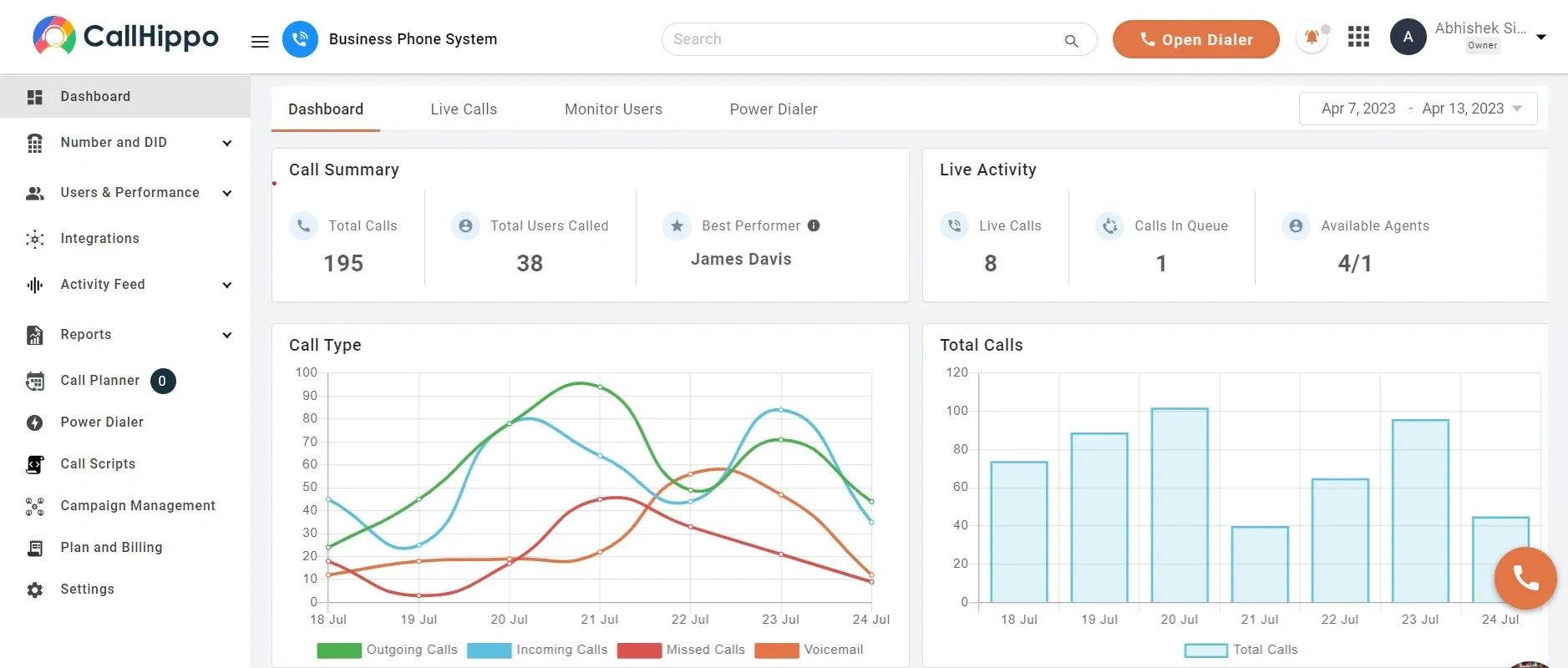
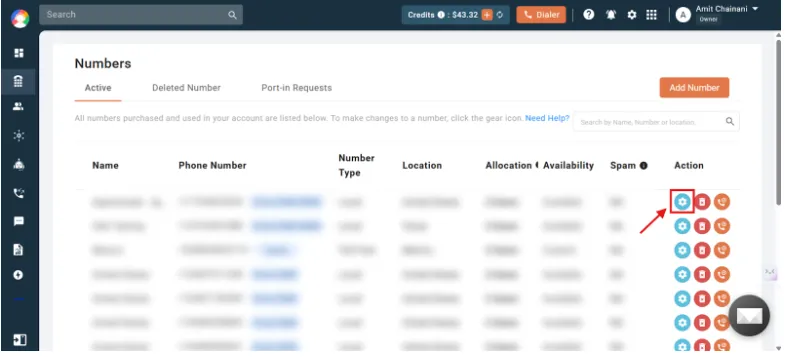
- Navigate to Numbers & DID. Then, choose the number to enable IVR.
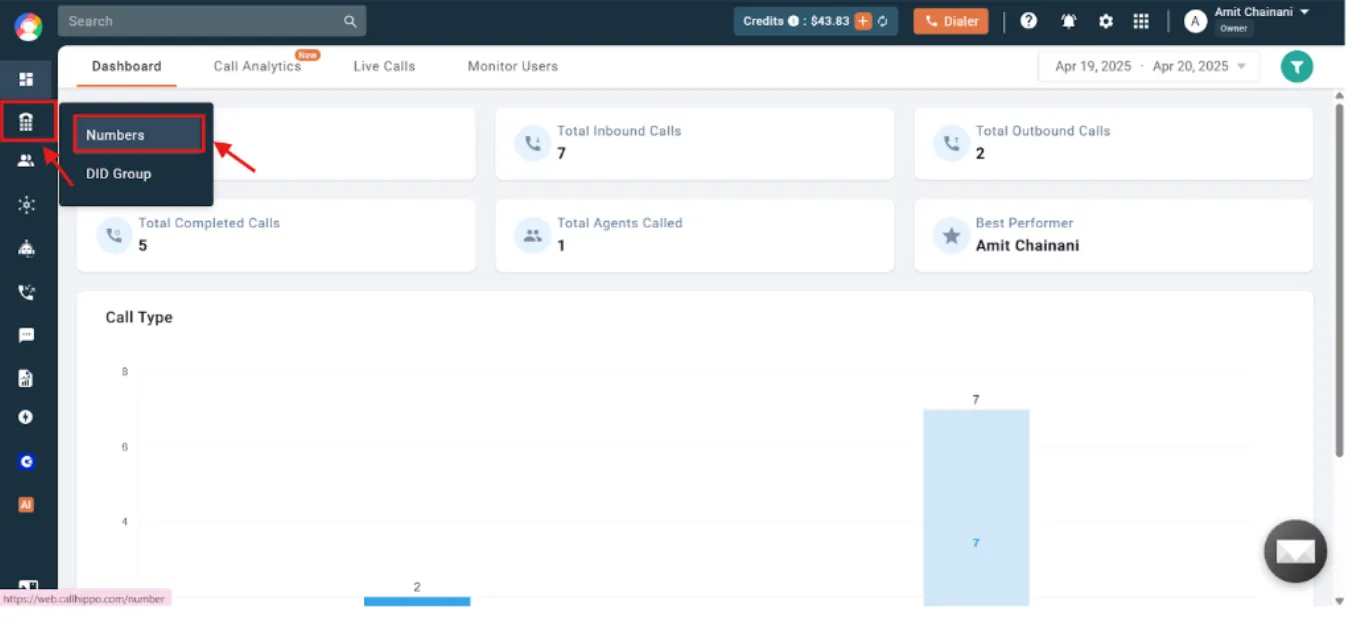
- Click on the “settings’ icon.
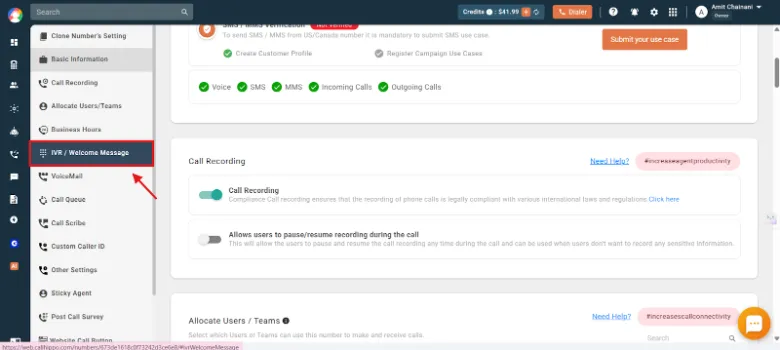
- Open IVR/Welcome message settings.
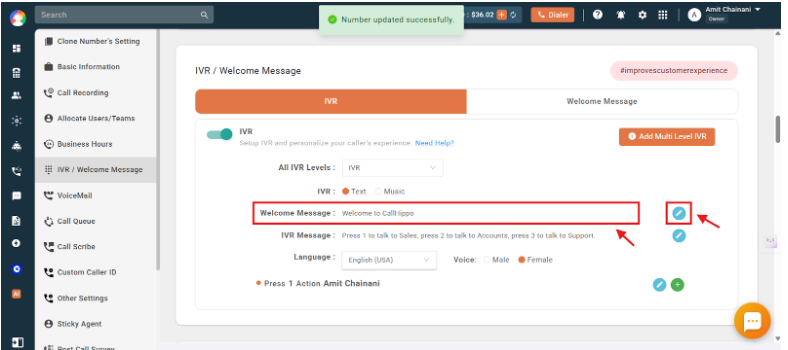
- Enable IVR mode and enter your welcome message.
- Create the IVR menu message. Select the language and voice.
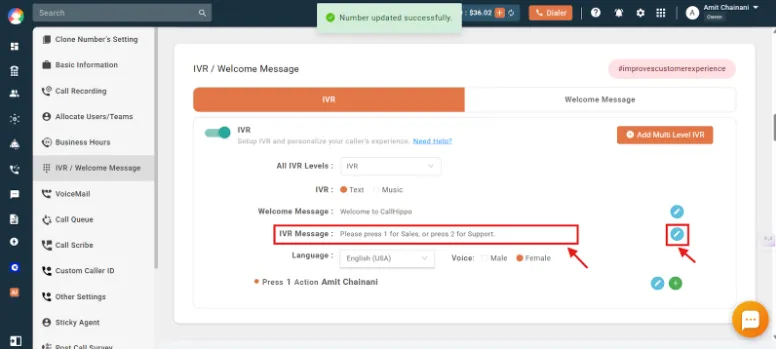
- Assign routing actions (add or remove the inputs).
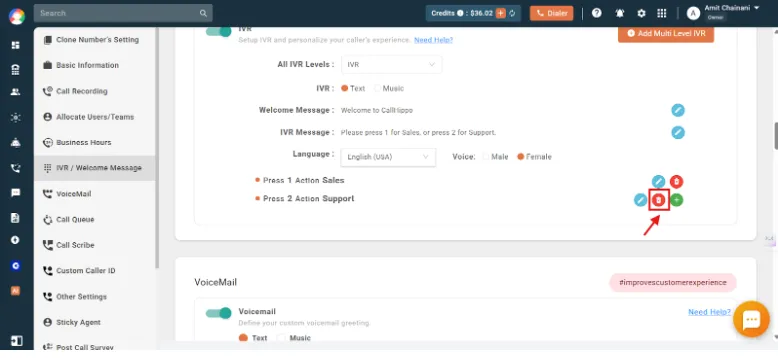
- Save Your Settings.
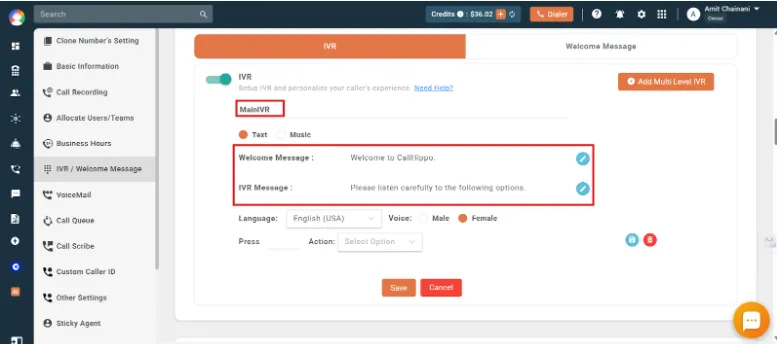
Businesses can also configure the IVR call flow as per their needs. Once done, they must test it to ensure everything works smoothly.
With CallHippo, businesses can instantly start handling calls in a smarter way. It ensures every customer interaction is efficient, professional, and well-organized.

Resolve Customer Queries in Minutes
Offer quick support and better experiences with CallHippo’s IVR
bottom circle
Key Features to Look for in Free IVR Software
Not all free IVR systems offer the same features and functionalities. The right features can be the decisive factor in determining whether your system just answers calls or actually improves the way your team manages conversations.
1. Call Routing and Auto-Attendant
IVR systems are defined by their ability to guide callers to the right destination. CallHippo’s call routing and auto-attendant features automatically direct calls based on user input. This prevents long transfers and ensures customers reach the right team quickly. With CallHippo, businesses can handle high call volumes without getting overwhelmed.

Pro-Tip
Start small and then scale if required. Start with basic routing for the top 3 – 4 call reasons. Then expand the menu as you gain more insights into customer behavior.
2. Speech Recognition and NLP
Modern IVR systems go beyond keypad inputs. With speech recognition and natural language processing (NLP), callers can simply say what they need. They do not have to press numbers. This creates a more natural experience. This even helps in resolving simple queries faster. CallHippo integrates voice recognition technology that makes IVR menus more interactive.
3. CRM and Helpdesk Integrations
An IVR system becomes far more powerful when integrated with your existing tools. Integrations with CRMs and helpdesks help call data sync automatically. This gives agents instant context even before they connect with the customers. CallHippo makes this process simple by linking call insights directly to your CRM workflows.
4. Call Recording and Analytics
Tracking conversations helps understand customer issues better and improve service quality. CallHippo’s call recording allows managers to review each and every interaction. While analytics helps gain insights into the trends, such as call duration, peak call hours, etc.
5. Multi-Level Menu Support
Multi-level menus create layered options such as department selection, service categories, etc. This structure helps callers reach the right destination without any sort of confusion. An advanced IVR service provider like CallHippo makes it easy to design and manage complex call flows.
Expert Insight:
- Review call recordings, drop-off points, and frequently selected menu options on a regular basis. This helps you improve your multi-level IVR call flow.
6. Text-to-Speech and Voicemail-to-Text
CallHippo’s automation features, like text-to-speech, convert written prompts into natural voice messages. And the voicemail-to-text feature takes it a step further. It transcribes voice messages into readable text. This way, teams can review messages quickly without replaying audio.
7. Security and Compliance
While managing customer calls, businesses often have to deal with sensitive information. CallHippo’s reliable IVR system includes strong security controls and compliance for global regulatory standards like HIPAA, ISO, SOC 2, and GDPR. This protects customer data and ensures businesses meet industry regulations.
8. Concurrent Call Limits and Scalability
Free IVR systems sometimes limit the number of calls you can make. Understanding these limits is important. A scalable system should allow you to handle multiple calls simultaneously. CallHippo provide flexible infrastructure that allows businesses to expand their IVR capacity.
Conclusion
Free IVR software is a great starting point. It is good for businesses that need call handling without high upfront costs. However, as your business grows, you may need more flexibility, reliability, and advanced features. For this, businesses might need to look for paid solutions.
If you’re looking for a more powerful and easy-to-deploy IVR solution, CallHippo offers smart call routing, multi-level IVR menus, CRM integrations, etc., to help businesses manage customer calls more efficiently.

Ready to Capture Every Customer Call?
Try CallHippo today and build a smarter call experience for your customers.
Take a 10-Day Free Trial No credit card required!
FAQs
1. Is there truly free IVR software available?
Yes. There are quite a few good, truly free IVR service available. They can help you with your basic IVR needs. However, it is crucial to note that this free software might not be a better fit if you require an advanced IVR system. For advanced IVR and more features, you would need to look for paid IVR software.
2. What is the difference between open source IVR and freemium IVR?
Open-source IVR is free to use and modify. But this free software usually requires technical setup and self-hosting. On the other hand, freemium IVR is cloud-based and easy to setup. But its advanced features and higher usage limits are typically locked behind paid plans.
3. Can free IVR software handle high call volumes?
Some free IVR services can handle high call volumes. Especially self-hosted open-source systems. However, many free tools place limits on concurrent calls or usage in their free plan.
4. What features should I prioritize in free IVR software?
Look for essential features like call routing, auto-attendant, CRM integrations, call recording, analytics, and multi-level menus. These features can help you manage calls efficiently and improve customer interactions.
5. Can I integrate free IVR with my CRM?
Yes, many IVR platforms offer integrations with popular CRMs. However, some integrations may only be available in paid plans. You must check this before opting for a solution.
Published : March 10, 2026
Harsh Bairagi is a B2B SaaS content writer with over 4 years of experience in the tech industry. Harsh believes in creating good copies to bridge the gap between tech and emotion. When not chasing clean copy or clever metaphors, he is busy catching up on his favorite sports.

Let’s Stay in Touch
Subscribe to our newsletter & never miss our latest news and promotions.
 24k+ people have already subscribed
Source