

 Updated : February 18, 2026
Get an AI-powered summary for this content:
During a call, have you noticed how one unclear dial-in instruction can delay a meeting by 10 minutes? A Forbes study shows that 98% of professionals want to work remotely at least part-time for the rest of their careers. This means conference calls are not going anywhere. If anything, they are becoming the default way teams connect.
In this guide, I will walk you through what a conference bridge actually is, how it works, and how to choose one that fits your team workflow.
What is a Conference Bridge?
A conference bridge means joining a meeting remotely using a virtual phone system. Be it an audio or a video conference call. You don’t need to call one by one; everyone dials into one shared line. It is a common mode for team meetings, client discussions, or urgent updates. The benefit is that you can join from different locations, yet the conversation stays connected and easy to manage.
How Does Conference Bridge Work?
At a glance, it appears as a simple concept. But a few smart technologies work together in the background to keep every call stable and connected.
1. The Technology Behind Conference Bridges
Behind every conference bridge, there is a mix of internet-based calling and cloud systems. Some offer free conference call options, while businesses prefer paid ones as they offer better team features. Here is what makes it work smoothly:
- VoIP carries voice over the internet instead of phone lines.
- SIP trunking connects calls across networks reliably.
- Cloud infrastructure manages capacity, security, and uptime.
This removes your hardware dependency and keeps the calling flexible.
2. How Participants Join a Conference Bridge
Joining a conference bridge is designed to be a quick process, so even first-time users can access it easily. There are multiple ways to join a conference bridge:
- Dial a phone number and enter a PIN:
In this, participants call a shared number from any phone and enter a PIN. This connects them directly to the meeting. Internet access is not needed in this mode. - Click a web link from an invite:
In this, you can join the meeting link, like on a free call application, which is sent via email or chat. The call opens instantly in a browser or web app. - Use one-touch join from a calendar or an app:
Here you can join the call with calendar integration. There is no dialing or PIN entry in this, so your time gets saved during busy meetings.
Types of Conference Bridges: Hardware vs. Software vs. Cloud-Based
There are mainly three types of conference bridges that are used for different use cases. The right choice depends on how your team works, where they are located, and what kind of flexibility you need. Let’s see how they differ:
| Feature | Cloud-Based Conference Bridge | Hardware-Based Conference Bridge | Software-Based Conference Bridge |
|---|---|---|---|
| Setup | Fully online, no hardware needed | Requires physical equipment on-site | Installed on local servers or systems |
| Maintenance | Handled by the provider | Managed by in-house IT teams | Needs regular updates and monitoring |
| Scalability | Scales easily for any team size | Limited by hardware capacity | Moderate, depends on system limits |
| Remote Access | Accessible from anywhere | Restricted to an office setup | Partially remote |
| Cost | Pay-as-you-use pricing | High upfront and maintenance cost | Moderate cost |
| Ideal For | Remote and growing teams | Large enterprises with legacy systems | Teams with internal IT support |
Key Benefits of Using a Conference Bridge
The benefit of a conference bridge can not really be seen on a tradition phone setup. On a VoIP or a cloud system, it is more affordable and gives real benefits.
1. Enable Seamless Remote and Hybrid Team Collaboration
Work does not stop just because teams are spread across different places. A conference bridge keeps everyone connected on one call. You do not need complex tools or long setup steps. Team members can easily join and share updates, which helps remote and hybrid teams to be aligned.

Upgrade to Clear, Reliable Conference Calls
CallHippo brings cloud-based conference calling to one dashboard.
bottom circle
2. Reduce Meeting Costs
Meetings become expensive when travel enters the picture. Conference bridges remove the need almost completely. You save money on flights, hotels, and meeting rooms. Even small teams notice this difference over time because they don’t have to spend on logistics and focus only on actual work. That’s why it is a practical choice for regular discussions.
3. Enterprise-Grade Security: Encryption, PINs, and Access Controls
Security matters the most when you discuss sensitive topics with your team. A conference bridge protects calls with encryption and secure access controls. PINs ensure that only invited participants can join. And hosts can lock meetings or remove participants, also. This creates a safe space for business conversations. Plus, teams meet internal standards with confidence.
4. Scale Effortlessly
One big advantage of a conference bridge is flexibility. It works just as well for a small team call as it does for a large company meeting. You don’t need to separate tools as the group grows. The same setup supports more participants, which makes scaling simple and predictable.
5. Integrate with Your Existing Workflow Tools
Conference bridges fit better when they work with tools you already use. CRM and collaboration tools keep context in one place. This reduces manual work and confusion, so your team spends less time switching tabs unnecessarily and more time actually talking and listening.

Pro-Tip
If your team is operating remotely or follows a hybrid setup, a cloud-based conference bridge will fit your workflow perfectly. You can join from anywhere, and it scales easily when more people join the call.
Conference Bridge Features That Actually Matter
Along with the features, it’s also important to look at how the conference bridge supports your meetings. Some free calling applications look good at first, but then they fall short when teams actually use them. This section helps you understand how to cut through and focus on what matters for your team:
1. Call Recording
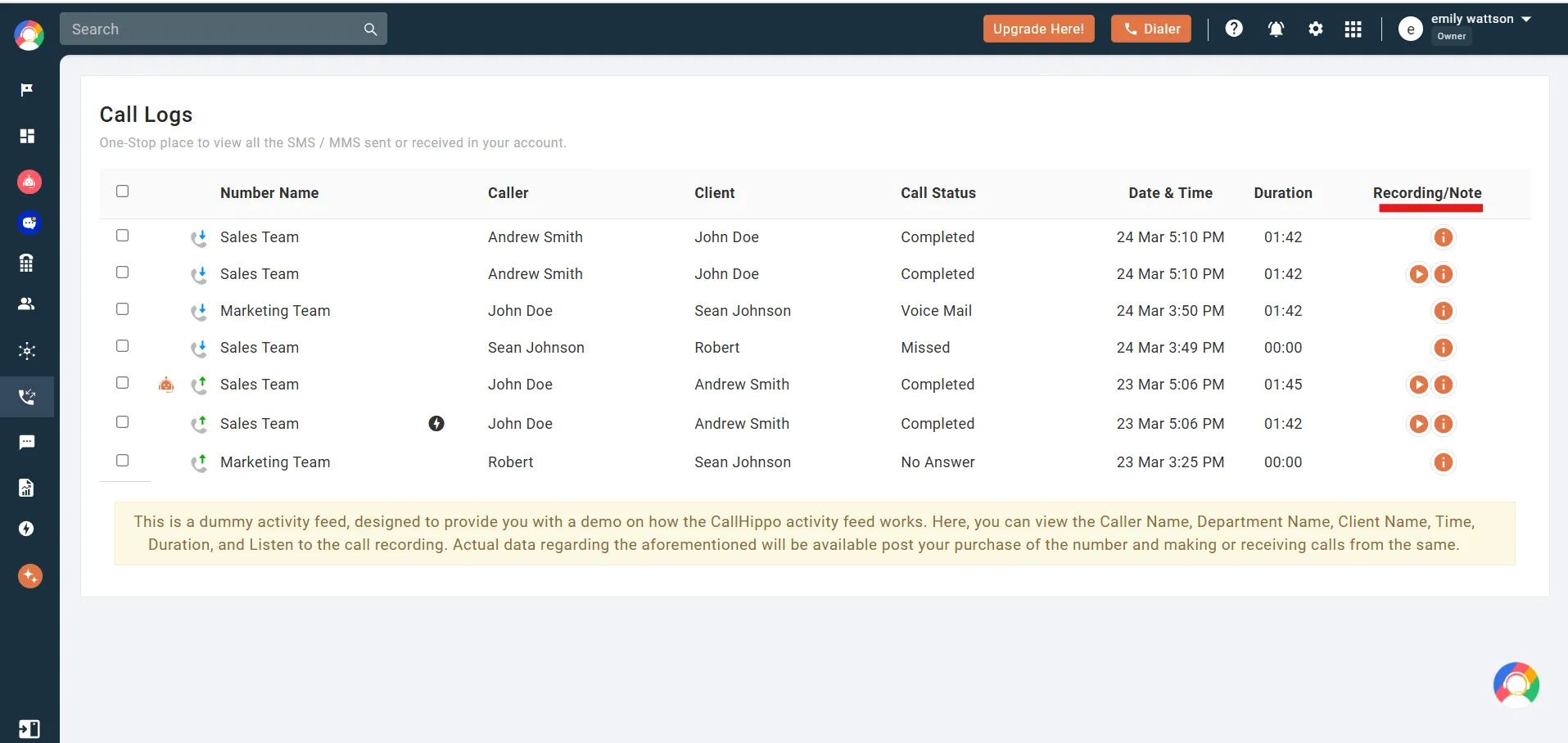
When your calls are recorded, you can go back and review the important discussions. It is useful for training members and clearing any doubts after meetings. You don’t have to rely on mere memory or notes; you have the actual conversation saved. This becomes especially valuable when you need to make quick decisions or when someone missed the call and needs the full context later.
2. Call Transcription
A call transcription feature turns your spoken words into readable text. It saves time because for any part of a conversation, you won’t have to replay a complete call. Teams can instantly scan the key points, actions, or decisions. For remote teams, this also helps when people work in different time zones and want updates by sitting through recordings.
3. International Dial-In Numbers
With these numbers, global participants can join without extra cost or hassle. They don’t have to worry about the long-distance charges, but dial a local number. Everyone is able to join smoothly, and this avoids any delays at the start of the calls, especially for external partners or clients.
4. Mobile App Support
You can’t carry a desktop setup everywhere. A good conference bridge should work beyond your desktop setups. With a mobile app, users can join meetings while travelling or working remotely. This flexibility becomes very important during urgent calls.
5. Participant Management Controls
Host controls are as important as any other feature. And not just that, they should be working seamlessly. Features like mute, remove, or lock the call help manage noise and distractions. During larger meetings, these controls keep discussions focused.
6. Integration Capabilities
Conference bridges work better when they fit into your existing workflows. It’s important that your communication system integrates with calendars, CRMs, or team tools to reduce switching between apps. Meetings start on time, invites are clear, and follow-ups stay connected to actual work. This small convenience adds up during daily team usage.
Top 5 Conference Bridge Services
There are these top five names in the conference bridge, which you can subscribe to. Go through each option and see what matches your workflows best.
1. GoTo Meeting
GoTo Meeting is widely known for its stable video conferencing and built-in audio conference bridge. Teams find it useful when meetings need to be structured and formal. It supports dial-in numbers, meeting links, and host controls that keep larger calls organized. It works well for scheduled meetings and client discussions. Video quality stays stable, and screen sharing is reliable. However, it is more suited for planned meetings than for everyday calling needs.
Best for
Teams that run scheduled meetings and prefer a classic meeting room experience.
2. CallHippo
CallHippo is a business communication platform that offers audio conferencing, call control, and team coordination. While it has not launched video meetings yet, businesses find it amongst the most reliable business calling options because of its accessibility and efficiency. It offers features such as conference call controls, call recording, live call monitoring, and easy participant management.
Best for
Large enterprises, growing businesses and remote teams that rely on voice calls and need quick scaling without any complex setup.
Run Better Conference Calls with CallHippo
- Secure Setup
- Reliable Connections
- Advanced Features
- Centralized Management

3. Dialpad
Dialpad combines calling and conferencing with AI-driven features. It offers conference bridges alongside real-time transcription and call summaries. This helps teams keep records without manual effort, and the experience also feels modern, especially for users who value insights from conversations. However, some important features are available only on higher plans, which can affect smaller teams.
Best for
Sales and support teams are mainly dealing with a high volume of calls.
4. Google Meet
Teams that are familiar with and have the Google ecosystem in their daily workflows find Google Meet as the best option. You can start a conference call directly from Gmail or Google Calendar. This makes scheduling and collaboration pretty easy. It works well when you already rely on Google tools daily. But advanced call controls and detailed meeting insights are limited as compared to business-focused calling platforms.
Best for
Teams that already use Google Workspace
5. RingCentral
RingCentral is a business communication platform that offers conference calling as part of a larger suite. It supports audio meetings, messaging, and video in one place. Teams find it useful as it provides everything under one system. The platform is stable and handles large teams well. But setup can feel heavy for small teams.
Best for:
Mid-size to large teams that want an all-in-one communication system.
Red Flags to Avoid When Choosing a Provider
There are some issues that you realize only when your team starts to use that tool. Consider these warning signs before you commit to any tool.
1. Hidden Limits Behind “Free” Plans
If a tool says that it provides a free conference call, read closely. Many free plans cap call duration on participant calls. It’s not like the tool is not worth subscribing to, but having this transparency before purchasing a tool is important. Otherwise, it becomes frustrating during real meetings.
2. Poor Call Quality During Peak Hours
Dropped calls or echo issues are not small problems. They disrupt meetings and kill momentum. That’s why invest in reliable providers who have a stable infrastructure. You can feel the difference in long calls.
3. No Control for Hosts
If you are the host and you don’t have the right to mute a person, meetings can turn chaotic. Host controls should be simple and must be. If they don’t, the platform was not built for teams.
4. Weak Support or Slow Responses
This is where the customer experience costs a platform. When something breaks during a meeting, help should be quick. When support gets delayed, it is a risky option to go for. Especially if calls matter to your business.
Why CallHippo’s Conference Bridge Stands Out?
Small details matter when your teams rely on calls every day. CallHippo stands out because it stays affordable and grows with you as your business scales.
1. Quick Setup
You don’t need IT support to get started. The complete setup process takes only 3 minutes. No downloads or waiting for approvals. Just sign up, pick your number, and start your first conference call.
2. Smart Call Routing
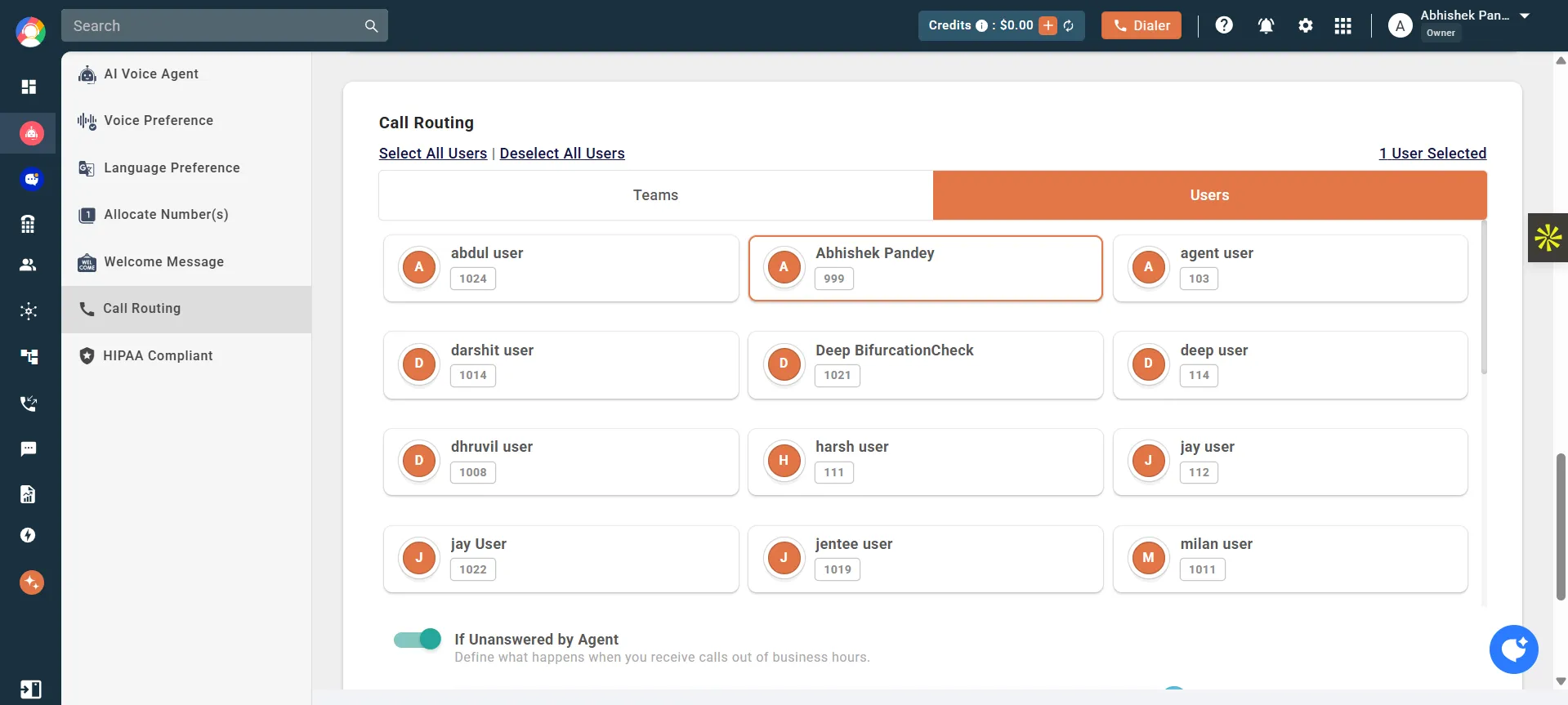
With the intelligent call routing feature, you can direct different types of calls to the right team members automatically. So when a sales call comes in during a support meeting, it doesn’t interrupt your flow. Your team stays connected, and calls reach the right person faster.
3. Call Recording
Toggle on this feature, and every conversation gets saved automatically. No extra apps and no integrations to manage. And if a team member misses the call or you need to review what was discussed, the recording is already there. You just need to switch the feature on which you will see on the dialer itself.
4. Real-Time Call Monitoring
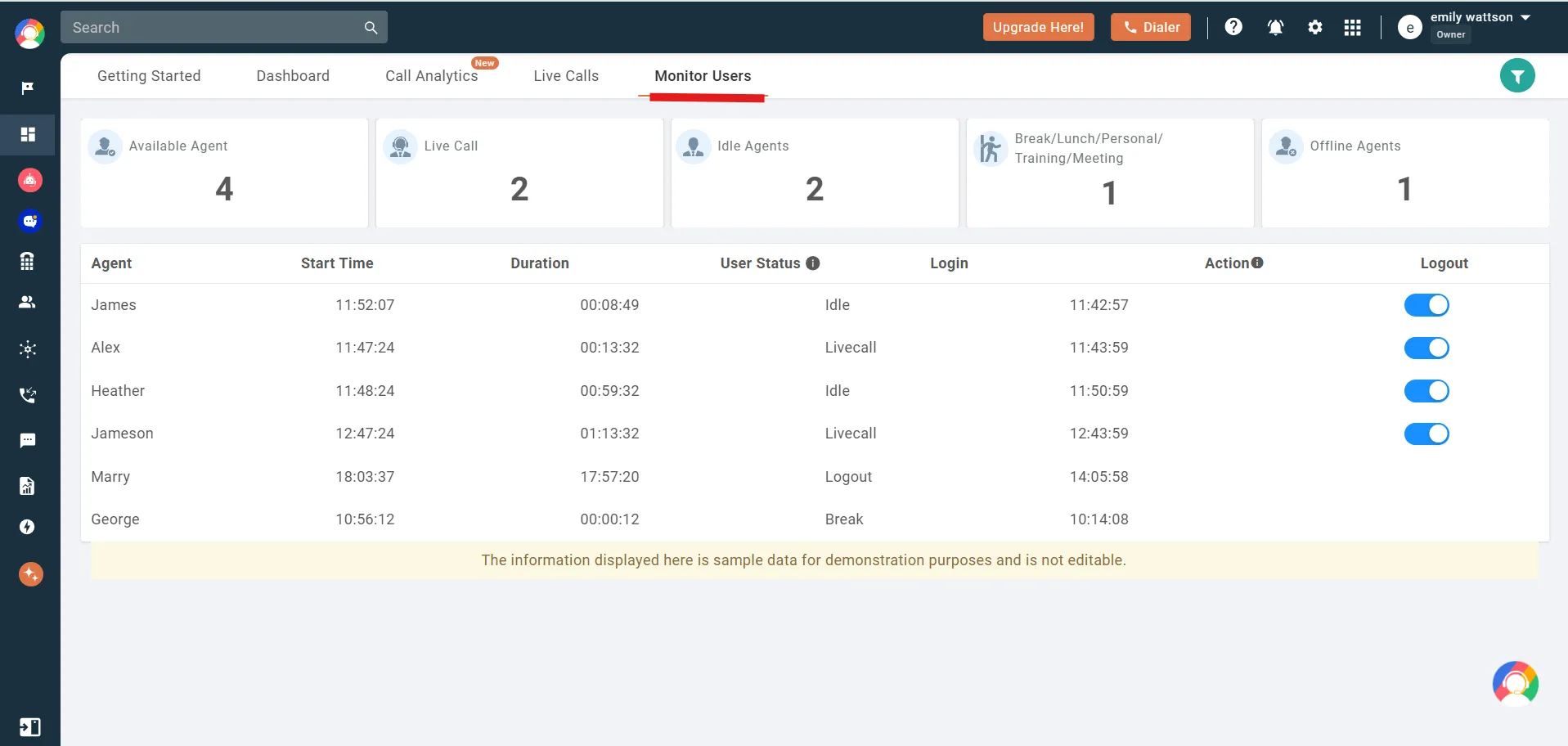
Managers can listen in on live calls without interrupting them. This helps with coaching new team members or stepping in when a call needs senior support. It’s a quiet feature, but teams that manage high-stakes calls rely on it daily.
5. Works Seamlessly with Your Existing Phone System
CallHippo integrates with your cloud PBX and virtual phone system without replacing them. So if you already have a setup, you can add conference calling features on top. This saves money and avoids the hassle of switching platforms completely.
Best Practices for Maximizing Conference Bridge Efficiency
A good conference bridge will do its job quietly. The real difference comes from how you prepare and run the call. Take note of these practical habits to stay focused and productive.
1. Pre-Call Preparation: The 5-Minute Checklist
Before anyone joins, take five minutes and check the basics. Test your mic and speakers. Share the dial-in details early and check the participant list once. This simple prep avoids late starts and repeated questions. It also sets a professional tone before the call even begins.
2. Host Controls
As a host, your controls shape the flow. Mute background noise early and admit the participants in batches if there are too many. When you have established control, people listen more, and interruptions naturally reduce.
3. Audio Quality Optimization
Audio problems ruin momentum fast. Ask everyone to mute when they are not speaking. Take a brief pause before switching speakers. These habits are basic but prevent most issues.
4. Troubleshooting Common Issues in Real Time
When someone in a call is having audio issues, ask them to reconnect or switch devices. If an echo appears, mute one line at a time to find the source. For dropped calls, share the rejoin link or number in chat.
When these practices become routine, conferences call appear more purposeful and controlled.

Ready to See How CallHippo Handles Conference Calls?
Join 5000+ businesses who have simiplified their global calling with CallHippo.
Take a 10-Day Free Trial No credit card is required!
FAQs
1. Is a conference call and conference bridge different?
Conference call and conference bridge are actually two related things. A conference call is the actual meeting where three or more people talk on the same call. You dial in, speak, listen, and discuss.
A conference bridge is the technology behind it. It is the system that connects everyone’s lines into one shared call. In simple terms, you join a conference call using a conference bridge.
2. How do I set up and use a conference bridge for meetings?
To set it up, you first need to sign up with a provider. After that, pick a dial-in number and set a PIN if needed. Share the number and the access code with the participants via email or a calendar invite. They can dial in or also click a link to join the call.
3. How many participants can join a conference bridge, and are there call duration limits?
It depends on the provider and the plan you have subscribed to. Free plans offer cap duration at 40-60 minutes. But paid plans usually don’t limit call length, so check your provider’s terms before scheduling long meetings.
4. How secure are conference bridges, and what security measures should I look for?
Look for end-to-end encryption, PIN protection, and waiting rooms. Hosts should be able to lock meetings and remove uninvited participants. Check if the provider follows GDPR or SCO 2 standards. Secure conference bridges also offer audit logs to track who joined and when.
5. What advanced features, like recording, transcription, and calendar integration, are offered?
Most modern platforms like CallHippo include call recording, automatic call transcription, and more. Calendar integration with Google or Outlook simplifies scheduling. Look for features like screen sharing, participant muting, and analytics.
Published : February 17, 2026

Ankit Dudhwewala is the CEO and Co-founder of CallHippo, a leading virtual phone system designed to optimize business communication through AI and automation. With a strong background in marketing and business administration, Ankit has successfully built and bootstrapped CallHippo. Ankit’s leadership and innovative approach have made him a prominent figure in the SaaS industry, driving growth and shaping the future of business communication solutions.

Let’s Stay in Touch
Subscribe to our newsletter & never miss our latest news and promotions.
 24k+ people have already subscribed
Source