
 Updated : December 10, 2025
Managing a call center effectively requires balancing multiple elements: agent training, quality assurance, and performance analysis. You also have to adhere to call center best practices to improve sales conversions and improve satisfaction. The average customer satisfaction score (CSAT) for call centers in the U.S. is around 73%.
However, you can break the benchmark with CallHippo’s QA Agents. It allows you to improve your CSAT by assigning a dedicated call center quality assurance agent that reviews each interaction. But how does it work? And what QA best practices should you follow to enhance conversion rates? Let’s understand.
You Can : Interact & Improve the CSAT with CallHippo’s QA Agent
What is Call Center Quality Assurance?
Call center quality assurance monitors, evaluates, and enhances agent performance and customer interactions. It assesses various communication channels against predetermined standards and key performance indicators (KPIs). QA aims to maintain service consistency, increase customer satisfaction, and drive ongoing improvements in call center operations.
Effective QA programs encompass call monitoring, performance feedback, coaching, training identification, and data analysis. This helps call centers improve customer service quality, recognize top performers, ensure regulatory compliance, and deliver superior customer experiences.
Key QA Metrics to Track (QA Scorecard)
QA in call center becomes much easier when you know what to measure. A few key metrics can give you a clear picture of your team’s strengths and the areas that need attention.
1. Customer Satisfaction Score (CSAT)
CSAT is the most direct way to know how customers feel after a call. It tells you whether the conversation has met their expectations or not. You can look at the score and instantly sense the overall mood of your customer base.
Formula: CSAT
- (Number of satisfied customers / Total survey responses) × 100
When CSAT drops, it usually means something deeper needs attention. This could be training gaps or unclear processes. And when you track it regularly, it helps you act before issues grow.
2. First Call Resolution (FCR)
FCR shows how often your team solves an issue of a customer in one attempt. It reflects clarity, ownership, and problem-solving skills. You will notice that higher FCR often leads to fewer callbacks.
Formula: FCR
- (Issues resolved on first contact ÷ Total issues reported) × 100
When customers don’t need to reach out again, they trust your support faster. This metric also reduces operational load on your team. Moreover, it is one of the most impactful numbers to improve.
3. Average Handle Time (AHT)
AHT is a metric that measures how long an agent takes to handle a call from start to finish. With this, you’ll better understand how smooth your processes are. Shorter calls usually mean your team is confident and informed.
Formula: AHT
- (Talk time + Hold time + After-call work) ÷ Total calls handled
However, speed alone is not the goal here, as you also need balance. When calls stay productive and respectful, the experience feels natural and customers stay satisfied.
4. Compliance Adherence
With compliance adherence, you get to know whether conversations follow industry rules and company policies. This protects both your customers and your brand. It also ensures that agents handle information the right way. When compliance scores are high, it means the risk factor is down. You also build trust with customers who value transparency and safety. It is a foundational metric in a QA scoreboard.
5. Net Promoter Score (NPS)
NPS helps you understand how likely customers are to recommend your service. It reflects loyalty and not only satisfaction. You get a clear view of long-term based perception.
Formula: NPS
- % Promoters – % Detractors
Note: In most industries, an NPS above 30 is considered good. Above 50 means excellent, and anything above 70 is world-classs. If the NPS score is low, it means customers are not confident enough to vouch for you. Improving this requires stronger relationships and consistent support quality.
6. Customer Effort Score (CES)
CES focuses on how easy it is for customers to get their issues resolved. The lower the effort, the smoother the experience would be. It is one of the most honest indicators of service efficiency.
Formula: CES
- Sum of all effort ratings / Total responses
A high effort score means customers struggle to find answers. And fixing this means reviewing workflows and agent training. Ultimately, it helps your team create better experiences for your customers.
7. Soft Skills Metrics [Tone, Listening, Empathy]
Soft skills reveal the emotional side of customer support. You might be technically strong, but this metric often decides whether the customer feels connected enough to trust you. It plays a real role in securing a lead. Because tone, clarity, and patience decide how the customers feel during the call. These small elements shape the entire experience. When agents listen well and respond with empathy, customers feel understood. It builds trust faster than any script would. Tracking these skills improves consistency across your team.
8. Agent Improvement Rate
Agent improvement rate shows how much progress your team makes after coaching. You may follow a solid QA process, but this metric tells you whether your training actually works. It also shows which agents respond well to feedback and who might need more support. When improvement becomes visible, overall call center performance rises. Your coaching sessions feel more meaningful and structured. Tracking this metric turns development into something measurable, not just hopeful.
Call Center Quality Assurance Best Practices to Improve Sales Conversion Rate
Quality assurance best practices for call centers directly impact sales conversion rates and enhance customer experiences and agent performance. These seven strategies will help you build a high-performing call center that consistently meets sales targets while providing excellent service.
1. Improve Agent Performance Through Continuous Monitoring
Regular evaluation of agent interactions allows you to address issues quickly, ensuring top performance. For example, if an agent struggles with objection handling, you can provide targeted coaching based on call reviews. A robust quality assurance process should include,
- Listening to calls and scoring them against specific sales-focused criteria
- Monitoring screen activity for efficient system use and adherence to best practices
- Reviewing chat and email transcripts to ensure consistent, clear communication
- When agents know their performance is monitored and supported, they become more proactive in improving their sales skills.
2. Harness Speech Analytics for In-depth Insights
Speech analytics tools offer actionable insights that help identify trends and optimize performance. This ensures agents have the guidance they need to close deals more effectively. For example, if multiple customers mention confusion around product pricing, you can adjust your script or retrain agents to explain pricing more clearly. These tools allow you to,
- Uncover recurring customer pain points
- Identify script deviations that may hurt conversion rates
- Provide data-driven coaching based on performance patterns
- Improve first-call resolution by addressing issues immediately
3. Invest in Trusted Call Center Software with QA Features
Your contact center quality assurance software can directly impact how well your agents perform. For example, using a platform that integrates speech analytics and auto-dialers can reduce idle time and increase productive calls. When choosing software, look for features like:
- Auto-dialers that minimize wait times and increase talk time
- Real-time performance tracking to offer instant feedback
- Advanced call analytics to monitor sales techniques
- Voicemail drop to automate sending pre-recorded messages directly to voicemail inboxes
For instance, CallHippo Business Phone System offers these features along with a QA agent tool that allows you to ensure the quality of each customer interaction.
4. Implement Regular Call Calibration Sessions
Calibration ensures that all evaluators assess agent performance consistently, which directly impacts sales. For instance, during a calibration session, you might find that certain successful sales techniques are overlooked in standard evaluations. Regular sessions allow your team to,
- Review calls from both successful and missed sales
- Align evaluation criteria with sales goals
- Discuss effective techniques that lead to higher conversions
5. Implement an Omni-channel Quality Assurance Approach
Today, customers reach out across various channels, and they expect the service quality to remain consistent regardless of the medium. What this means is that a customer starting an interaction via chat should receive the same level of service when they switch to a phone call.
Here are three easy ways to implement an omnichannel QA approach.
- Monitor interactions across all channels (phone, email, chat)
- Ensure agents are trained to handle transitions between communication methods
- Maintain consistent service quality across every platform
6. Integrate Sales Metrics into QA Evaluations
Integrate sales metrics into your quality assurance process to help your agents balance call quality with closing deals. Focus on measuring key areas like conversion rates, objection handling, and upselling effectiveness. This not only connects performance improvements to sales results but also highlights which specific behaviors drive conversions.
7. Leverage Customer Feedback for QA Improvement
Customer feedback offers insights that internal evaluations may overlook. Post-call surveys, satisfaction scores, and categorized complaints provide a clearer view of customer experiences. Incorporate this feedback into your QA process to align agent performance with customer expectations and enhance both service quality and conversion rates.
8. Set Clear & Measurable QA Goals
You cannot improve what you cannot measure. Clear QA goals help your team understand what good performance actually looks like. They also give you a solid reference point while reviewing calls. So when you can measure your goals, your evaluations also stay fair. You also avoid any misunderstandings and last minute confusion. Over time, everyone learns what they are working toward and why it matters.
9. Leverage AI for Automated Scoring
AI helps you move faster without losing accuracy. It listens to calls, checks your QA rules, and creates consistent scores. This gives you more time to focus on coaching and less time on manual reviews. You can also use AI scoring to:
- Reduce bias in evaluations,
- Catch patterns that you may not notice,
- Review calls at a larger scale, and
- Improve the overall quality of feedback.
As a result, your QA team becomes more efficient.
10. Establish Transparent QA Standards
Teams feel more confident and comfortable when they know exactly how they are being evaluated. Having transparent QA standards gives agents clarity. They also help supervisors maintain consistency in every review. You can create simple QA documents that list key behaviors and scoring guidelines. Most importantly, make these accessible to everyone. When people know the rules before the evaluation, the entire QA in call center process feels fair and trustworthy.
11. Create Continuous Feedback Loops
Some improvements happen only when the feedback is regular. Continuous feedback helps agents grow faster, and it also builds a culture where coaching is normal and not something to feel reluctant about. Here is a simple loop that you can follow:
- Review calls
- Share clear action points
- Practice with roke plays or short exercises
- Track improvement after a few weeks
With this becoming a habit, you will notice steady performance growth.
12. Evaluate Chatbots & Virtual Agents
Chatbots and virtual agents are now part of many customer journeys. So they also need to be evaluated regularly. You should check how well they understand queries and how smoothly they guide customers to solutions. Look for improvements in:
- Response accuracy
- Speed of replies
- Escalation handling
- Customer satisfaction after bot interaction
When bots perform well, your human agents will also get more time for complex issues. This improves your overall customer experience.

Your QA deserves a Tool that Grows with Your Team.
CallHippo gives you the insights, automation and clarity you need to put these best practices into action.
bottom circle
Essential Features You Should Expect in Call Center QA Software
Good call center QA software should feel like a partner. It should simplify your work, highlight what matters, and give you a clear path to improvement. Let’s explore the important features of a QA software and how CallHippo supports this journey.
1. Data Unification (CCaaS, CRM, WFM Integration)
Data unification brings everything into one place. Your CCaaS, CRM, and WFM tools work together instead of functioning in silos. This way, you get a full view of every customer interaction without switching tabs. CallHippo supports this by integrating with popular CRMs and business tools. This helps teams access call history, customer details and performance data from one connected workspace. As a result, QA insights become smoother and more accurate.
2. Automated Interaction Scoring
Automated scoring is a feature that helps you review calls faster. The system checks calls against your QA criteria and it gives you an immediate score. This reduces manual effort and keeps evaluations consistent. On CallHippo, automated call tagging and disposition help structure call data clearly. You no longer miss key moments in a conversation. Plus, you also free up your team to focus on coaching and improvement instead of endless call reviews.
3. AI-Driven Coaching Tools
AI-driven coaching tools point out exactly where agents can improve. They highlight the tone issues, missed steps, and you get a better idea if there are any skill gaps. This gives coaches a clearer direction during feedback sessions. CallHippo supports this with AI-backed features like sentiment insights and smart call analytics. Agents learn faster because the suggestions are specific. And, over time, coaching becomes more structured and predictable. Also, your QA results start showing visible results.
4. Auto-Summaries
Auto-summaries save time by writing call notes for you. The system listens, pulls keys, and turns them into clean summaries. This helps agents stay focused on the conversation instead of paperwork. These summaries also help QA teams review calls quickly. And you get accurate context without spending time replaying the entire conversation.
5. Sentiment Analysis
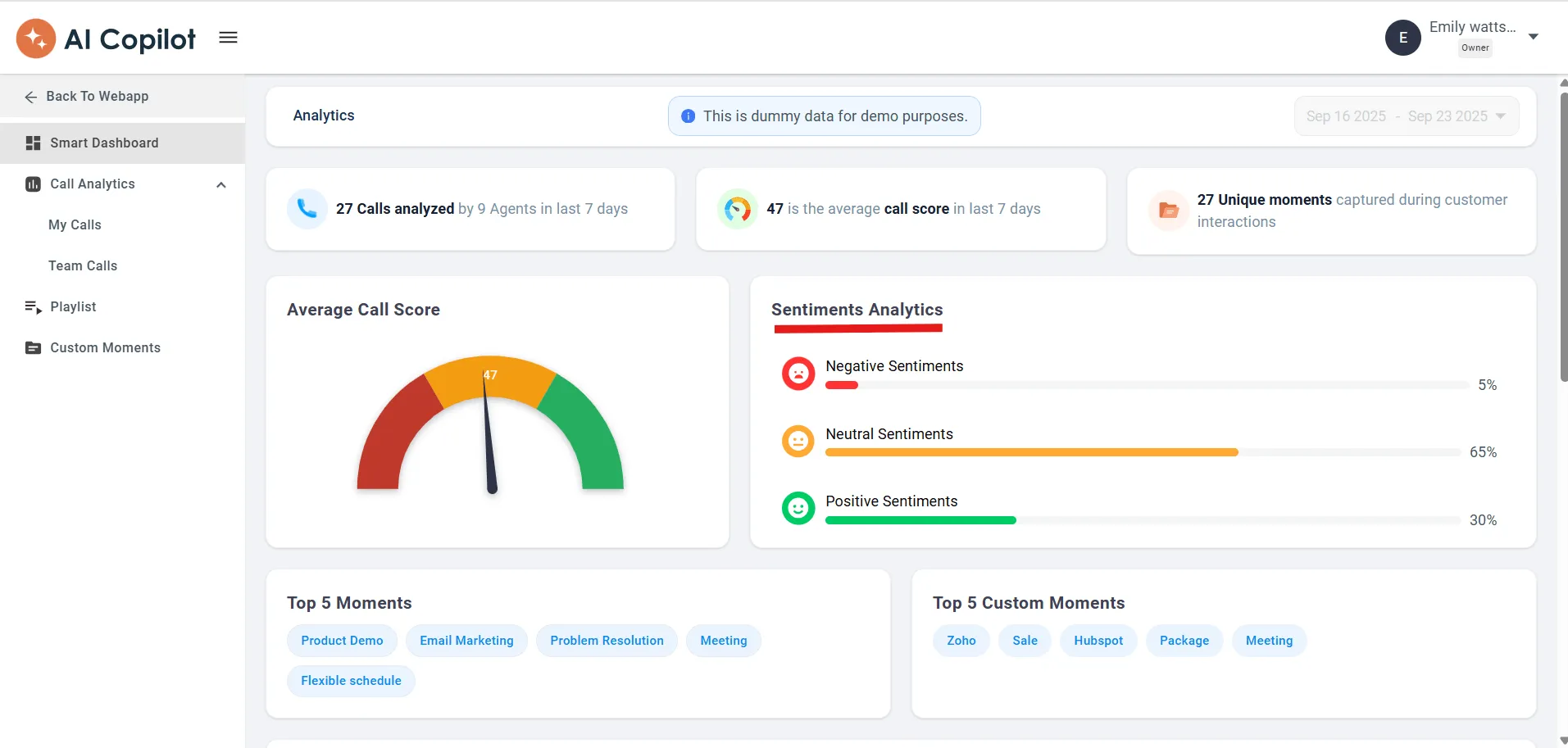
Sentiment Analysis shows you how a customer feels during a call. It detects emotional cues like frustration, relief, or confusion. This feature helps you understand the experience behind the words. CallHippo adds an edge here. Its sentiment insights make it easier to catch unhappy customers early. This gives teams a chance to step in and recover the conversation before it turns into a churn risk.
6. Predictive Analytics
Predictive analytics helps you stay one step ahead because it looks at past patterns and tells you what might happen next. This includes possible spikes in call volume or areas where agents may need support. When you can predict issues early, your decisions improve. You allocate resources better and solve problems before they slow your team down.
7. Performance Dashboards & Reporting
A good dashboard shows you everything at a glance. You can track QA scores, agent performance, and customer trends in one clean view. Reports also help you explain results to teams without confusion. CallHippo offers real-time dashboards and call reports that are easy to understand. When insights are visual and easy to digest, conversations become more productive. You can take quicker actions and share feedback that actually lands well.
8. Real-Time Call Quality Monitoring
Real-time monitoring lets you see call quality as it happens. You can spot audio issues, customer frustration, or agent struggles before the call ends. This helps you support your team in the moment. CallHippo makes this even easier with live call insights and alerts. It gives you instant visibility into call health, which helps you guide agents in real time and protect customer experience.
Why Call Center QA Matters for Customer Experience (CX)
Customer experience shapes how people feel about your brand. When your QA process stays strong, every call becomes more consistent and helpful. This ultimately creates a better experience that customers remember.
1. QA as a CX Improvement Driver
QA in call center works like the foundation of a great customer experience. It helps you see how each call influences the customer’s journey. Along with this, you get a clearer picture of what makes them feel supported and what creates unnecessary effort. With this understanding, guiding your team becomes easier. Remember: agents learn what creates positive moments. And slowly, these small shifts turn into a noticeable improvement in overall CX.
2. Impact on Customer Retention
Once CX begins to improve, the next change you notice is retention. Strong QA plays a direct role in keeping customers with you for the long run. When the customers feel that the calls are smooth and supportive, they trust your service more. They feel heard and valued. And that emotional comfort is mostly what keeps them from switching to a competitor. So in a nutshell, a better QA usually gives you:
- Faster and more confident resolutions
- A sense of reliability in every call
- Fewer repeated issues
- Stronger Loyalty over time
The math is simple: retention grows when customers know what to expect and walk away satisfied.
3. Link Between QA and Brand Reputation
As retention strengthens, something else starts to grow in the background – your brand reputation. Call by call, your reputation is built. Every interaction becomes a moment where the customer forms an opinion about your brand. QA here helps you make sure that these moments stay positive. It keeps your team aligned and your service predictable in the best way. When customers experience consistency, they talk about it. These small stories add up and with time, they shape how the market sees you. QA protects your brand by keeping every call steady and every experience dependable.
Best Call Center QA Software Platforms
A strong QA platform can take a lot of pressure off your team. To help you find the right fit, here are some of the top call center quality assurance software tools available today.
1. CallHippo
CallHippo is one of the top players in the market. It is a cloud-based phone and call center system that helps businesses manage calls over the internet. It offers a clean interface, global virtual numbers (100+ countries), and call analytics so teams can connect with customers from anywhere. It works well for small to medium teams who want flexible and reliable calling without a complex setup. CallHippo offers access to advanced features like sentiment analysis, call analytics, and more at the most affordable cost. One feature many users appreciate is the number auto replace option. It switches outgoing numbers every thirty days, which helps reduce spam issues and keeps outreach clean.
Key Features
- VoIP Calling
- AI Features (Sentiment Analysis, Automatic Call Disposition, Agent Behaviours)
- Automated calling and dialer system
- Call Recording
- Call Analytics
- CRM and third-party integrations
Pros
- Users often say CallHippo is easy to use, even for non-technical team members.
- The call quality and reliability are frequently praised – calls tend to be clear and stable.
- It integrates smoothly with popular CRMs and tools that make customer data and call history easily accessible.
Cons
- You may experience occasional dialer or connection issues – such as delays in call setup or occasional voice glitches.
- Some users say it takes a little time to get familiar with all the call center features.
Pricing
- Basic: $1 per user/month
- Starter: $19 per user/month
- Professional: $29 per user/month
- Ultimate: $45 per user/month
- Enterprise: Contact sales
*Pricing as of 9-12-2025.
Let AI Take the Pressure
Off Your QA Process
- Sentiment Analysis
- Automatic Call Disposition
- Agent Behavior Insights
Start Free Trial 
2. AmplifAI
AmplifAI is a performance-management platform designed to help call centers improve agent performance and customer experience. It uses real-time coaching, workflow automation and performance analytics. These features help teams to manage their workflow better and stay on track. The platform works well for both small and large teams that aim to boost quality and consistency over time.
Key Features
- Real-time Agent Coaching
- Workflow automation
- Agent Performance Dashboards
- Interaction Scoring and Quality Analytics
- CRM Integrations
Pros
- AmplifAI’s real-time coaching tools help agents improve faster and stay motivated.
- Users say the performance dashboards make it easier to track key metrics without digging into spreadsheets.
- The automated workflows reportedly save time for call center managers by reducing repetitive tasks.
Cons
- Some users note a learning curve when they first set up workflows and analytics dashboards.
- The pricing gets high as you scale up or use advanced modules.
Pricing
Contact platform
3. NICE CXone
NICE CXone is a cloud-native contact center platform built to handle voice, chat, email, social and more from a single hub. It brings together many features, such as omnichannel routing and AI-powered automation, which helps teams manage all customer interactions with ease. This platform fits well for mid to large-sized brands that need a scalable solution.
Key Features
- Omnichannel Routing
- Workforce Optimization
- AI Automation
- Analytics & Reporting
- Cloud-Native Scalability
Pros
- The AI automation simplifies routine tasks and reduces the manual workload for agents and supervisors.
- As call volume grows, the platform adapts without complex setup or heavy hardware demands.
- Users find the omnichannel functionality easy to use, especially when managing calls, chats, and emails from one place.
Cons
- For smaller teams, the advanced features and pricing tiers may feel heavy and expensive.
- Some users have reported that the interface is not user-friendly.
Pricing
- Digital Agent: $71 per user/month
- Voice Agent: $94 per user/month
- Omnichannel Agent: $110 per user/month
- Essential Suite: $135 per user/month
- Core Suite: $169 per user/month
- Complete Suite: $209 per user/month
*Pricing as of 9-12-2025.
4. Dialpad
Dialpad focuses heavily on AI to make everyday conversations easier for support teams. Its live transcription and real-time call suggestions are the core of the product, and many users choose it for these AI abilities alone. From the user perspective, the platform feels modern and simple, which helps teams get comfortable with it quickly.
Key Features
- Voice Calling
- AI Transcription
- Call Summaries
- Omnichannel Messaging
- Call Recording
Pros
- The call quality is clear and stable, which makes daily conversations smoother.
- People appreciate the AI transcriptions because they help them catch details they might miss during the call.
- The mobile and desktop apps feel easy to use, so teams can switch between devices without any friction.
Cons
- Some users mention occasional call drops or short connection issues that break the flow.
- Some advanced features are available in higher plans, which makes it hard for smaller teams to access everything.
Pricing
- Standard: $15 per user/month
- Pro: $25 per user/month
- Enterprise: Contact sales
*Pricing as of 9-12-2025.
5. CallMiner
CallMiner is built for teams that want deeper insights from each of their interactions with customers. It listens to calls, analyzes sentiments and highlights patterns that you can otherwise easily miss during manual reviews. Many teams use it because it turns big volumes of conversations into clear insights they can act on.
Key Features
- Speech Analytics
- Sentiment Analysis
- Automated Scoring
- Quality Dashboards
- Interaction Insights
Pros
- Its speech analytics feature is very accurate as it picks up details that help in understanding the customer behaviour.
- The dashboards show trends clearly, which makes reporting easier.
- Teams appreciate how quickly they can review large amounts of calls without listening to each one manually.
Cons
- Some users mention that the platform takes time to learn due to the depth of analytics available.
- The setup process can get a bit complex when you integrate different data sources.
Pricing
Contact platform
6. Observe.AI
Observe.AI is designed for teams that want more visibility into agent performance and customer conversations. It analyzes calls, highlights coaching opportunities and gives supervisors a clearer view of how each interaction went. Many users like it because it reduces guesswork and shows exactly where agents need support.
Key Features
- Call Transcription
- Automated Scoring
- Real-Time Monitoring
- Coaching Insights
- CRM Integrations
Pros
- Transcriptions are very detailed, and they help them to understand the customer’s intent more clearly.
- The coaching insights feature makes the feedback sessions more structured and useful.
- Teams say their call quality monitoring improves because they get insights more often.
Cons
- Some users mention that processing large volumes of calls can feel slow at times.
- The interface is complex, especially to navigating multiple analytics screens.
Pricing
Contact sales
7. Balto AI
Balto AI is a contact center platform designed for small and mid-size teams. It helps agents during live calls by giving them real-time suggestions they can follow with ease. This makes tough conversations feel more manageable and keeps call quality steady even when the team is growing. It also gives managers more visibility into what happens on calls so they can guide agents with clearer feedback.
Key Features
- Real-Time Guidance
- Live QA Alerts
- Call Transcription
- Playbooks
- Agent Performance Insights
Pros
- The live guidance feature is supportive and helps agents stay confident on tough calls.
- Teams like Balto keep conversations consistent even when newer agents are learning the ropes.
- Many appreciate that it fits smoothly into their workflow without requiring heavy setup.
Cons
- Its real-time suggestions can feel a bit fast until you get used to them.
- It takes time to customize playbooks based on different call types.
Pricing
Contact platform
8. MaestroQA
Maestro is a call center QA software that is built for support teams that want a smoother and more organized QA process. It helps managers review conversations, score interactions and share feedback in a clear and structured way. Many teams find it helpful because it cuts the chaos out of QA and makes coaching feel more collaborative instead of corrective.
Key Features
- QA Scorecards
- Coaching Workflows
- Performance Reporting
- Rubric Builder
- Call Monitoring
Pros
- Maestro QA gives its users a clean and simple space to review calls without feeling overwhelmed.
- The coaching tools help managers give clearer feedback which makes agents more open to improvements.
- Many teams appreciate how easy it is to build custom scorecards based on their own standards.
Cons
- Some users say the setup takes time because there are many QA options to configure.
- Others mention that reporting can feel a bit slow when exporting larger sets of data.
Pricing
Contact platform
Conclusion
Quality assurance is not just about reviewing the calls. It is more about helping your team deliver experiences that the customers remember. When QA tools support you with better insights and coaching, it becomes easier to build consistency and confidence across all interactions. This is exactly where CallHippo makes a difference. It gives you the essential QA features you need at a price small and mid-size teams can work with. The sentiment analysis, number auto-replace and detailed call analytics add real value without creating a steep learning curve. So if you want a tool that supports your agents and improves customer experience without adding complexity, CallHippo is worth considering.
FAQs
1. How do you pass QA in a call center?
You pass QA by following the guidelines your team has set for every call. This usually means that you stay polite, listen carefully, resolve the issue clearly and follow any process steps that your company requires. And when you combine good communication with the right call handling steps, your QA scores improve naturally.
2. How much does a call center quality assurance specialist make?
The salary aspect depends on the location, experience and the company. In most places, QA specialists earn more than entry-level agents. The reason is that their role involves analysis and feedback. On average, they make a moderate to competitive salary that grows with skill and experience.
3. What tools are used for call center quality assurance?
Teams prefer to use QA scoreboards, call recording tools, speech analytics and coaching platforms. Modern QA tools also include dashboards, automated scoring systems, and sentiment analysis. Platforms like CallHippo, CallMiner, and Observe.AI are commonly used for this. When choosing between call center software vs PBX systems, modern cloud solutions offer more flexibility and advanced features for quality management.
4. How does AI improve call center QA?
AI analyzes calls faster and spots issues that you would very easily miss manually. It highlights tone, intent and customer sentiment. It also gives automated scoring and coaching insights so agents know what to improve. With AI in place, it becomes more accurate, consistent, and much quicker also.
Explore this content with AI:
Published : December 9, 2025
Ananya Dubey, Sales Manager at CallHippo, brings years of SaaS sales experience. She specializes in business communication solutions, call center software, and building long-term relationships that drive growth for mid-market and enterprise clients.

Let’s Stay in Touch
Subscribe to our newsletter & never miss our latest news and promotions.
 +24K people have already subscribed
Source