


 Updated : December 26, 2025
Is your business also facing the issue of calls getting dropped? If yes, voicemail forwarding can be a real deal for your business.
According to a recent report, about 28% of all business calls go unanswered. This leaves a huge chunk of opportunity untapped and hanging.
Now, imagine knowing how to forward a voicemail message. With just a simple strategic change, those 28% unanswered calls can be turned into opportunities.
This guide discusses how to forward voicemails. Also, we will shed light on when you must forward them and the benefits of voicemail forwarding.

Expert Advice
“Efficient voicemail forwarding ensures seamless business collaboration. But to make the most of it, you must understand how to do it on every device. To escape this hassle, rely on a device-agnostic credible communication platform like CallHippo. It extends holistic voicemail features to significantly enhance your customer service at no extra cost.”
What is Voicemail Forwarding?
As the name suggests, this feature allows you to forward voicemail recording/voicemail messages to your colleagues, support teams, friends, families, or any other contact you choose.
The forwarding process is the same as forwarding email, voice message, and text-based messages. But, in this case, you are forwarding a voice message. You can also convert the voicemail messages to different audio files format and forward via email.
You need a dedicated communication platform to handle your internal and external voicemail messages. To take your customer service one step ahead, avoid letting calls go to voicemail and adopt call routing so that your calls are automatically directed to the best-suited (and available) agents basis your predefined criteria.
How to Forward Voicemail from a Computer (VoIP/Desktop Platforms)?
Forwarding a voicemail through a VoIP/desktop platform is quite easy. As the main purpose of these platforms is to let you manage your phone calls, messages, voicemails, etc., easily.
Let’s suppose the VoIP platform you are using is CallHippo. Below are the steps you must follow to set up voicemail forwarding.
Step 1: Open the CallHippo desktop app’s dashboard. You will find a “User” tab; click on it.
Step 2: A “User List” will be displayed on the dashboard. Select a user.
Step 3: Once you select the user, you need to click on the “Forward-to-device” tab. Then, tap to turn it on.
Once the forward-to-device toggle is on, you can easily send voicemail messages to that particular user. This is how easy it is to forward voicemail with the help of CallHippo.
.webp)

Voicemail Forwarding: One Platform To Every Device
Forward voicemails in seconds with CallHippo’s unified communication platform.
bottom circle
How to Forward a Voicemail on Android?
If you are aware of the steps, forwarding a voicemail on an Android device can become pretty easy and straightforward.
Let’s see the step-by-step process to forward a voicemail on Android:
Before Starting, You Must Note:
- More often, Android uses the Google Voice Phone app or a carrier-provided visual voicemail app. Therefore, the labels/icons might seem a little different; however, the main steps are the same.

Step 1: Start by opening your “Phone app” and go to to the “Voicemail” section.
Step 2: Select a particular voicemail that you want to forward. Then, a detailed view of that particular voicemail will be displayed to you.
Step 3: Now, click on the “share” icon. As soon as you click on the “share” icon, all the sharing options will be displayed on your Android phone.
Step 4: Select the medium (text message, email, etc.).
Step 5: Add the receiver’s number/email. Then, click on the share button. The voicemail will be sent in an audio format or as a link.
How to Forward a Voicemail on iPhone (iOS)?
iPhone voicemail forwarding is simple through the built-in Visual Voicemail feature. Follow the steps below to start forwarding voicemail to an Apple device quickly:
Before Starting, You Must Note:
- iPhone uses Visual Voicemail inside the Phone app. Voicemail forwarding uses the iOS Share Sheet to send the voicemail.
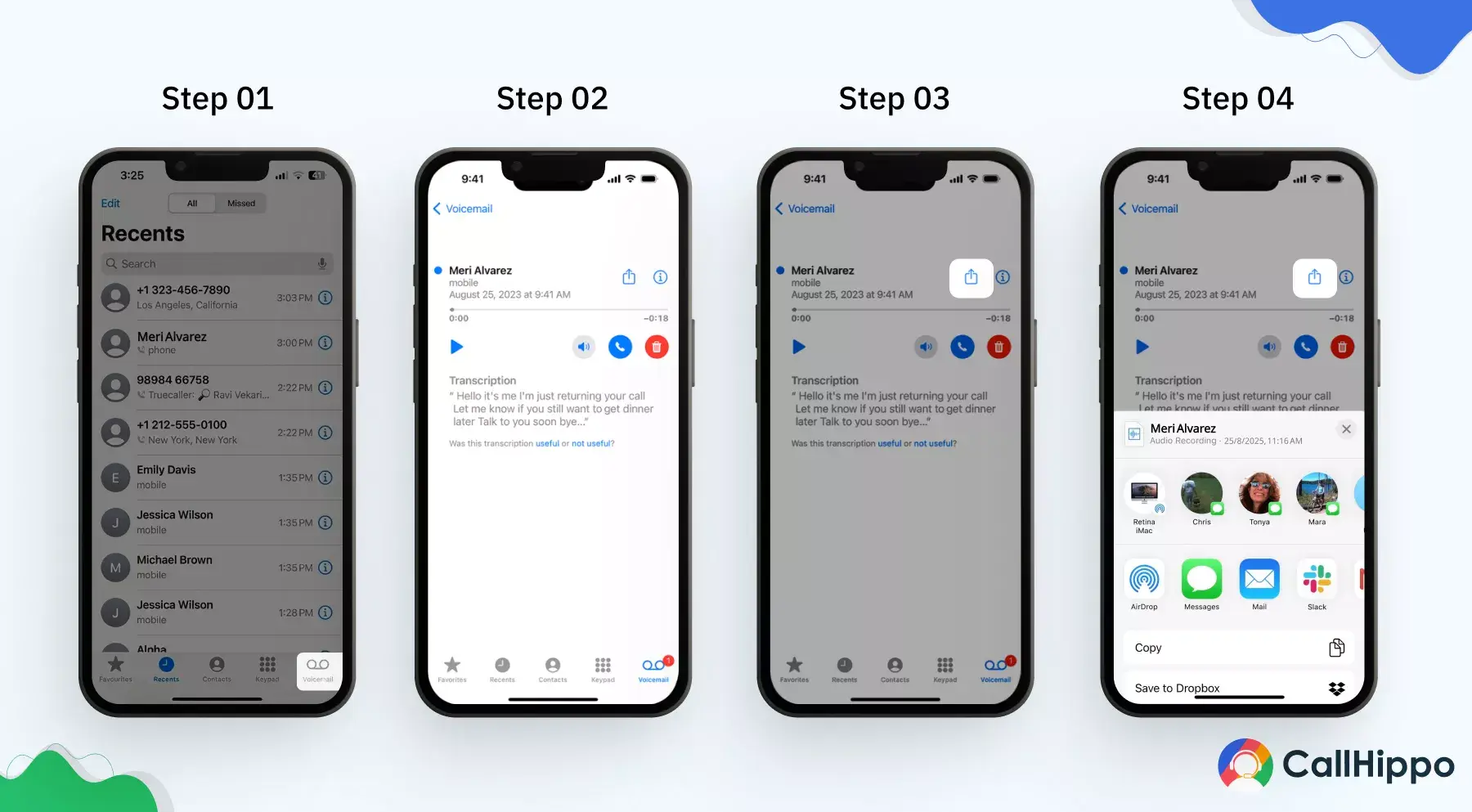
Step 1: Open the “Phone app”. Then, tap on the “Voicemail” tab.
Step 2: Look for that particular voicemail that you want to share from the list of voicemail. Then, click on it.
This will open up a detailed view of that particular voicemail.
Step 3: Then, click on the “share” icon on your iOS device.
Step 4: Then, select the medium via which you want to send the voicemail. It can be via messages, mail, AirDrop, or any other third-party app of your choice.
Step 5: Lastly, you have to add the recipient’s number/email. Once added, click on send. The voicemail will be shared.
How to Forward a Voicemail on a Landline / PBX System?
Contrary to popular belief, forwarding voicemail messages via landlines is possible. Let’s look closely at the steps you must undertake to achieve this feat.
Step 1: Start by pressing the voicemail button
Either press the voicemail button on your device or dial 86. If your device doesn’t have a dedicated voicemail message button, simply dial 86.
Step 2: Enter the passcode
Once you’ve dialed *86 or pressed the voicemail button, enter your passcode. This passcode should be the same one you set up when configuring your voicemail.
Step 3: Navigate the menu
Each operator has a unique menu with different functions. Follow your carrier’s instructions. Here are guidelines for some major operators –
- AT&T – In case of a power or network outage, dial *372, enter the forwarding number and press #. AT&T offers various features for different situations.
- Verizon – Listen to the voicemail and select Other options by pressing the dedicated key. Press 4 to forward and proceed to the next step.
- T-Mobile – Dial and hold key 1 to access the voicemail settings menu, then press 2 for Forward Message.
Step 4: Enter the recipient’s number
Key in the recipient’s number you want to share voicemails with, then press the # button.
Step 5: Complete the transfer
You can forward a voicemail successfully once you’ve followed the above steps.
Recommended Read : How to Forward a Text Message to Another Number
When Should You Forward a Voicemail?
So, we have now understood how to forward voicemails. Now, it is time we understand in what scenarios you need to forward a voicemail. Here’s a list of the most common scenarios.
1) When it Needs to be Reviewed by a Colleague
Forwarding the voicemail to the right colleague ensures shorter response times, as they are the ones with the necessary information.
Forwarding the audio delivers complete context. This helps the receiving teammate make more accurate decisions.
2) When Assigning Tasks/Follow-ups Based on the Voicemail
Voicemails often contain requests that require specific follow-ups. Instead of handling everything yourself, forward them.
This helps you delegate tasks efficiently to the team members responsible. The recipient gets the full message directly from the caller. This reduces miscommunication.
3) When Addressing Urgent Customer Complaints
Customer complaints need immediate attention. Forwarding the voicemail directly to the team ensures the complaint is taken care of with prompt action.
Hearing the customer’s exact words allows the team to analyze the urgency accurately. It also ensures an appropriate and empathetic response from the team.
4) When Sharing Positive Customer Feedback
Not all voicemails are problems. Some contain great feedback that deserves to be celebrated. Forwarding positive messages boosts team morale.
It also gives managers real examples they can use during training or performance reviews.
5) When Archiving the Voicemail for Audit Purposes
Some voicemails contain details that must be preserved. It can be for legal or compliance reasons.
Forwarding the voicemail ensures it is documented. It also ensures your organization meets regulatory requirements.
6) When Verifying a Specific Problem Reported
There are times when a voicemail contains details that need reviewing by an expert. Forwarding the voicemail lets subject-matter experts assess the issue exactly as the caller described it.
It also helps the team to analyze the issue faster. Ultimately, this results in improved accuracy and reliable resolution.
How to Fix Forwarding Issues Across iPhone, Android & PBX Systems?
Even when working without any friction most of the time, there might be occurrences when you may end up facing a few problems. The great news is that most of the issues are quick to solve. Here’s how to troubleshoot them.
1) The “Forward” Option is Missing on iPhone or Android
There might be scenarios when the “forwarding option” isn’t there at all. It’s due to the carrier not supporting the visual voicemail. Even an outdated voicemail app can cause such errors.
In some cases, if you switch between mobile data and Wi-Fi, you can refresh the feature. And after that, if the option is missing, it might need a quick reset.
What’s the Fix?
- Restart your phone
- Refresh the voicemail app.
- Contact your carrier and check whether the feature is blocked.
2) Forwarded Voicemail has No Sound or Poor Audio Quality
If the voicemail plays with no audio or sounds glitchy, a low-quality audio-recorded message might be the issue. A similar issue can be faced if there is excessive background noise or when the network is unstable.
Once thing should also be kept in mind, that the audio clarity issue might only occur once you forward the voicemail, not before. This is because the file gets compressed while sharing. Also, the receiving device might not support certain audio formats. That could also be a reason behind low audio quality.
What’s the Fix?
- Play the voicemail on your device to confirm the original quality.
- Re-forward using a different method.
- Update your voicemail/Phone app.
- Ask the receiver to re-run the voicemail with another media player.
3) Voicemail Not Sending Due to Large File Size Limits
Some voicemail files are too large to send. High-quality audio or long messages can easily exceed file size limits. So, whenever this happens, the voicemail might show a “file too large” warning.
The file limit may differ based on the apps you use. Therefore, what may fail on SMS may work over email/WhatsApp and vice versa.
What’s the Fix?
- Forward the voicemail via email and not SMS.
- Use cloud-sharing options.
- Compress the file before sending.
- Use a channel that lets you share a comparatively larger file.
- Use VoIP platforms like CallHippo that handle larger audio files.
4) Voicemail Forwarding Fails on Weak or Unstable Networks
A stable connection is one of the basic requirements when forwarding voicemail. Because if your connection drops or fluctuates, the voicemail might not get uploaded. You might not be able to send it either, especially larger files.
What’s the Fix?
- Instantly switch from Wi-Fi to mobile data, or vice versa, based on which source is offering better network stability.
- Turn Airplane Mode on and off to reset your network.
- Try restarting your device if the network is stuck.
- For PBX systems, check corporate network restrictions.
5) Voicemail File Format Not Supported by the Recipient’s Device
Different devices manage the voicemail inbox differently. Even the formats differ based on the device.
If the receiver’s device is unable to open the voicemail, it might be due to the reason that their device does not support that format. The voicemail will simply appear blank. This is more common between iPhone and Android.
What’s the Fix?
- Send the voicemail via email. This way, the original format is preserved.
- Convert the file as per the receiver’s device before forwarding.
- Use a cross-platform VoIP app like CallHippo to avoid format issues.
- Ask the intended recipient to try a different media player.
Benefits of Voicemail Forwarding for Every Business
Voicemail forwarding comes with a host of different benefits for users and organizations. For starters, it allows the organization to never miss any important interaction. Apart from that, here are 5 benefits offered by voicemail forwarding.
1. Better visibility
Voicemail forwarding ensures that critical messages reach the right individuals promptly. Businesses can improve visibility and prevent messages from being overlooked or lost in a general inbox by directing voicemails to specific team members or departments. This heightened visibility enables efficient handling of time-sensitive matters and enhances communication effectiveness.
2. Greater accessibility
The forwarding feature eliminates the limitations of traditional voicemail systems, which often require physical access to a specific device. With forwarding capabilities, voicemails can simultaneously be delivered to multiple destinations, including email inboxes, mobile devices, or alternative phone numbers.
Greater accessibility to voicemail empowers users to retrieve and respond to them conveniently, regardless of their location or device.
3. Reduced effort
Instead of manually relaying messages, employees can rely on the forwarding feature to distribute voicemails efficiently, saving time and resources for more strategic tasks. This automation minimizes the risk of human error and ensures swift and accurate message delivery.
4. Faster response
Voicemail forwarding to the appropriate recipients significantly reduces the response times. Businesses can promptly address customer inquiries, resolve issues, and provide timely assistance that customers expect in today’s fast-paced digital environment. You can also reduce customer wait time by redirecting call queues to voicemails.
5. Documentation
Forwarding voicemails to email accounts or other digital platforms empowers businesses to create a comprehensive record of voice communications. This documentation is a reference for future interactions, facilitates collaboration among team members, and supports compliance requirements or dispute resolutions. Having a digital trail of voicemails enhances accountability, accuracy, and transparency within the organization.
Wrapping Up
Mastering voicemail forwarding empowers seamless communication, collaboration, and productivity. It offers a tangible solution in the dynamic landscape of modern communication. Embrace its benefits and make voicemail forwarding a valuable asset in your toolkit.
To make the most of voicemail forwarding, leverage a unified platform like CallHippo, which offers multiple associated voicemail features, to ensure improved internal and external communication. CallHippo offers you all the voicemail benefits at no extra cost, so what’s the wait for?
FAQs
1. Can you forward a voicemail on any phone?
Yes, you can. It can be on Android or on iPhone. Based on the device, the process might differ a bit. However, the core steps will remain the same.
2. Can I forward the voicemail to email?
Yes, you can forward voicemails to email by converting them into audio files.
3. Is it possible to auto-forward voicemails?
Yes. But the ease of forwarding voicemail depends on the phone system you use. With CallHippo, you can simply route them to the right person. This makes the resolution time faster.
4. Can I send a voicemail to someone on WhatsApp or Messenger?
Yes, but not all VoIP systems support this. Therefore, you must use a VoIP system such as CallHippo to make the sharing process easier.
5. Does forwarding a voicemail notify the original sender?
No, the files are only shared with the person that you select and no one else.
6. What are the best practices for safe and professional voicemail forwarding?
There are quite a few best practices that you can follow. Below is the list:
- Check the voicemail before forwarding
- Use email to preserve voicemail’s original format
- Send it to the right person
- Use a stable network when sharing
- Use VoIP platforms like CallHippo to share voicemail
- Protect sensitive voicemail with critical details
7. Can we forward voicemails to more than one person?
Yes, just like a normal text message, you can forward a single voicemail to more than one person.
8. Can we forward voicemails to more than one person?
Yes, just like a normal text message, you can forward a single voicemail to more than one person.
Explore this content with AI:
Published : December 23, 2025
Harsh Bairagi is a B2B SaaS content writer with over 4 years of experience in the tech industry. Harsh believes in creating good copies to bridge the gap between tech and emotion. When not chasing clean copy or clever metaphors, he is busy catching up on his favorite sports.

Let’s Stay in Touch
Subscribe to our newsletter & never miss our latest news and promotions.
 +24K people have already subscribed
Source