

 Updated : January 21, 2026
Get an AI-powered summary for this content:
Remote work is normal now. But the problem is, a lot of business calling still run on the office logic, which is desk phones and fixed extensions. And in these systems, you can’t really track what’s happening once the team is distributed.
In fact, Zoom reports that 75% of employees say that their current remote work tools need improvement. This shows that businesses still are using tools that don’t actually support remote setups that well.
A remote office phone system fixes this issue.
You get one business calling setup for your team. And that’s it – with this setup, your team can work from anywhere (laptop, mobile, browser). The best thing – you keep the control, visibility, and give your customers a consistent customer experience.
What is a Remote Office Phone System?
A remote office phone system is a cloud-based business phone system that helps your team make phone calls and receive them without a physical office. This system gives your team flexibility and costs much less than traditional phone setups. Most of these systems run on VoIP (Voice over Internet Protocol). Means calls are made over the internet and not the traditional phone lines.
The biggest benefit is that your entire calling setup lives in the cloud, which includes:
- Your business phone number
- Extensions for teams and departments
- Call routing rules
- IVR (auto-attendant)
- Call recordings
This means your team can work from literally anywhere – without breaking the calling workflow. Your customers get a straight, professional, and well-managed phone system.
7 Best Features Of a Remote Office Phone System
For businesses, it’s not actually about making calls from home. It’s about having control, visibility, and consistency in a scenario where your team is spread across time zones.
I’ve picked 7 features to help you decide why you should have a remote workforce phone system now:
1. Call From Anywhere (Desktop, Mobile, or Browser)
This is non-negotiable. Your team should be able to make or receive business calls from:
- Laptops,
- Mobile phones
- Browser apps
Why does this matter? Remote teams are remote because they want flexibility, and they keep switching devices throughout the day. A good system keeps calls uninterrupted and professional, no matter where or how your team logs in.
2. Smart Call Routing
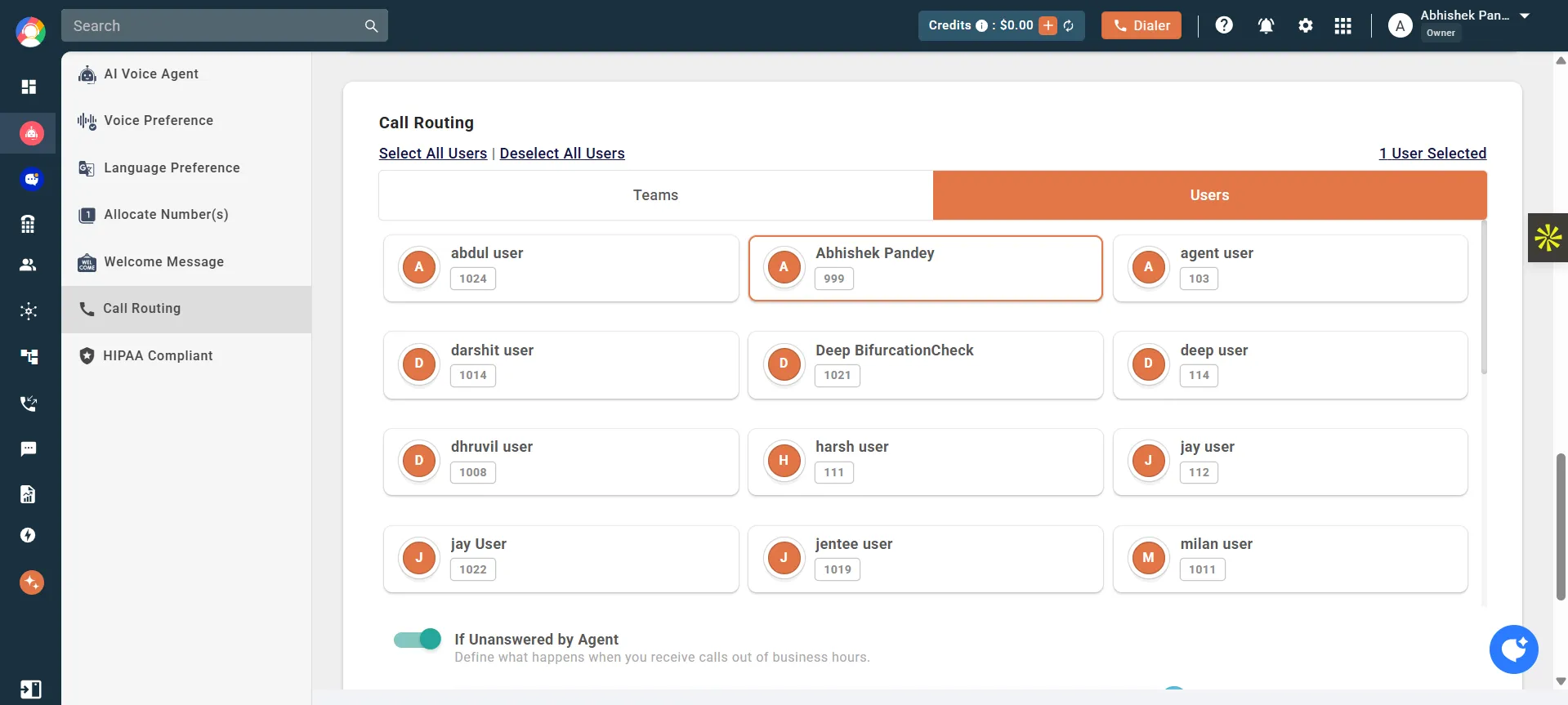
In a distributed setup, routing calls to the right person manually is a recipe for delays. Smart call routing is a feature you get with CallHippp that uses logic and transfers calls automatically.
With CallHippo’s smart call routing, you can:
- Route calls by department or team
- Set rules based on time zones or working hours
- Share calls across ring groups if one agent is not available
The result? You miss fewer calls and give faster resolutions – without callers bouncing around.
3. IVR (Auto-Attendant)
IVR is the core feature of a remote phone system. Because this is what answers your calls first.
It helps you:
- Greet callers professionally
- Guide them to the right team
- Reduce unnecessary call transfers
For remote businesses, IVR ensures that your company still feels “organized,” even without a physical office.
4. Centralized Call Analytics and Reporting
The idea is simple – if you can’t see what’s happening, you can’t improve it. You need a clear view of your call volumes, peak hours, and how your team handles incoming calls. This visibility becomes more important when your teams aren’t physically present.
CallHippo makes all your data available in one place, so it becomes easier to track call activity, spot patterns, and understand team performance without manual reporting.
Data replaces guesswork. It gives you the clarity you need to make smarter decisions every day.
5. Call Recording for Quality and Training
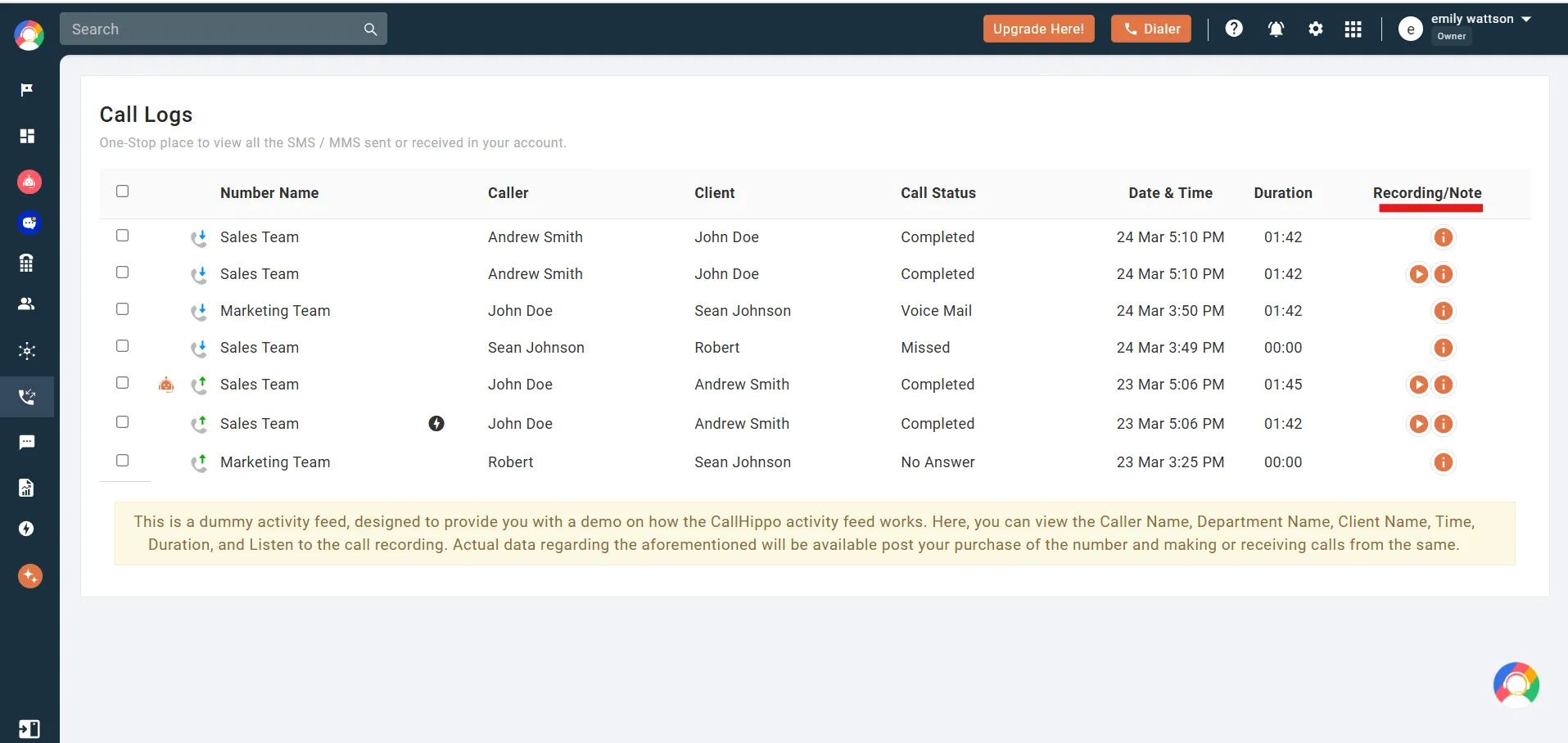
Call recording is not about micromanagement. It’s about improvement. Recording calls can help you in various ways:
- Train new hires faster
- Review real customer interactions
- Improve sales and support quality
- Handle disputes with clarity
These recordings are a big learning source for the remote teams.
6. Easy Scalability (Add or Remove Users Instantly)
Remote teams grow fast – or change just as quickly. A good remote office phone system makes it easy for you to:
- Add or remove users
- Create new extensions
- Update call flows without changing any hardware
No phone reviewing. No long setup cycles. Just quick changes that match how modern businesses move.
7. Integration With Business Tools (CRM, Helpdesk, More)
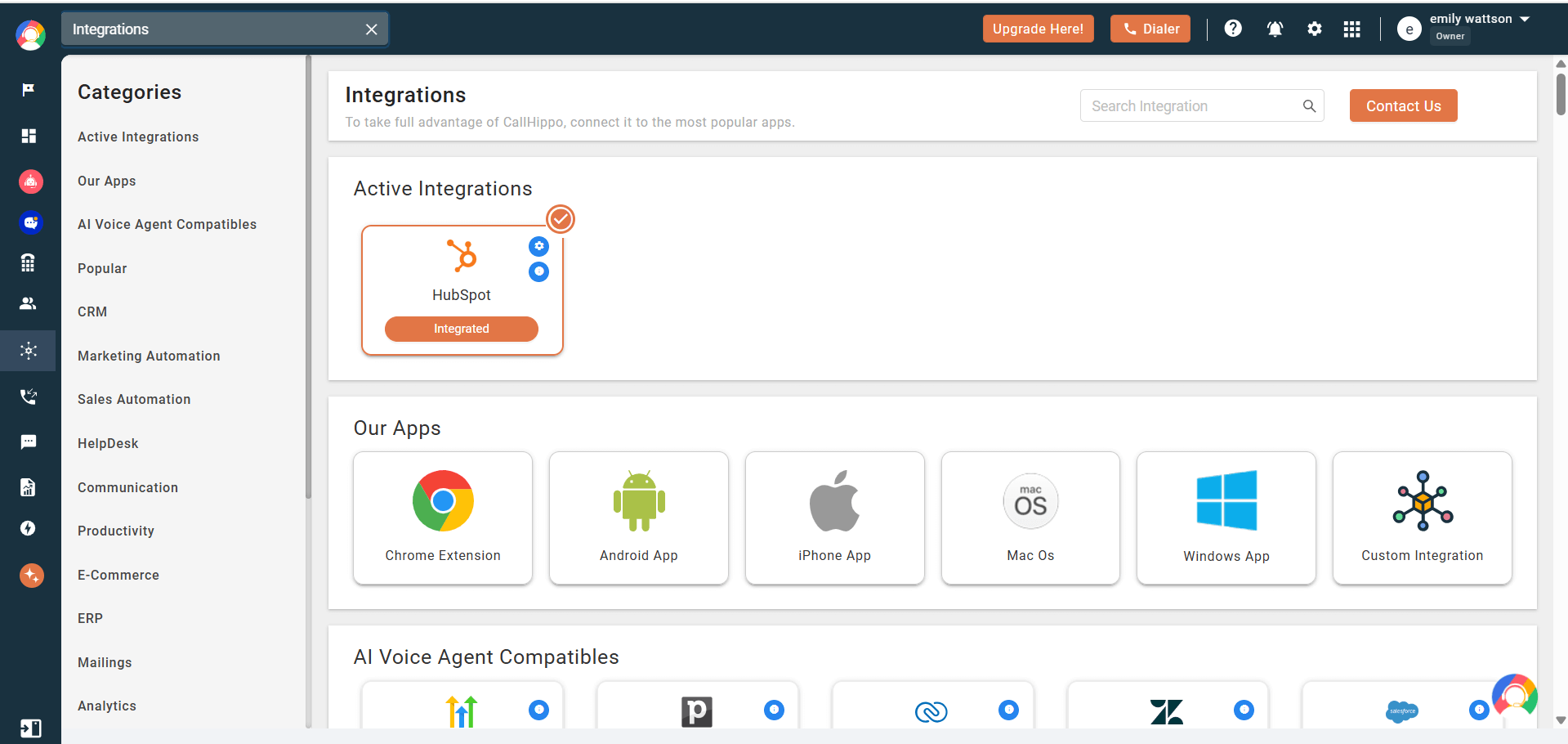
This is what integration does – imagine a sales rep finishes a call instantly and sees the customer’s details. They know what was discussed and what to do next, without switching tabs or updating notes manually.
When the system connects with your CRM or helpdesk, calls are automatically logged and tied to customer records. Conversations stay organized, follow-ups happen faster, and calling becomes part of your workflow – not a disconnected task.
Remote Work Is Flexible.
Your Phone System Should Be Too.
- Smart Routing
- Call Analytics
- Tool integrations, and more
Start Free Trial 
7 Key Benefits of Remote Office Phone Solutions
Features explain how a system works. Benefits tell you why it’s worth using.
1. Your Team Can Work From Anywhere:
Calls, extensions, and routing work the same whether employees are at home, in the office, or on the move. This removes the location dependency and keeps communication across the business.
2. Customers Get a Consistent Calling Experience
Customers don’t care where your team sits. They just want quick and professional responses. Working from home phone solutions make sure that calls are answered properly, routed to the right team, and handled with the same structure every time. This creates a reliable experience, even for fully distributed teams.
3. Better Visibility Into Team Performance
Visibility drops generally when teams go remote. A remote work office phone system fixes that as managers get insights into call activity, response time, and team workloads. You can see the gaps, improve coverage and optimize the overall performance based on real data and not just the assumptions.
4. Faster Response Times and Fewer Missed Calls
Smart routing, call queues, and flexible call handling ensure that calls reach someone who can answer them. As a result, customers wait less and fewer calls are missed. And with this, without increasing your team size, you can resolve the issues faster.
5. Lower Costs Compared to Traditional Phone Systems
Switching to a remote phone system means cutting costs without cutting connections.
| Cost Area | Traditional System | Remote/Cloud System |
|---|---|---|
| Setup | Big spend on hardware & wiring | Just apps or optional IP phones |
| Maintenance | IT staff & repair costs | Provider handles updates & support |
| Scaling | Hard, needs new hardware | Easy, add/remove users instantly |
| Call Charges | High for long-distance | Internet-based, often free/cheap |
| Upgrades | Expensive every few years | Automatic, included in plan |
| Space Needs | Equipment in every office | Fully virtual, no extra space |
| Monthly Bills | Line rentals + call fees | Simple subscription per user |
6. Easy Scaling as Your Business Grows
Whenever you hire a new team member or expand into a new region, you don’t need a new phone setup for that. You can add users, numbers, and call flows with the setup remaining the same. Now this makes the pace of your growth faster and more efficient.
7. Better Control Over Business Communications
You don’t have a physical office, but you stay in control. From call routing rules and recordings to access management and reporting, these systems give businesses the oversight they need to maintain quality and accountability.
Core Technology Behind Remote Office Phone Systems
A remote office phone system is designed to promote mobility, scalability, and reliability. Instead of counting on static infrastructure, it leverages cloud-based technology to maintain geographically dispersed teams in sync.
1. Cloud-Based VoIP
Remote phone systems are run mostly on cloud-based VoIP (Voice over Internet Protocol). It sends voice over the internet securely without the use of physical phone lines or a physical desk phone. So, employees can dial business calls for any location.
The VoIP systems are hosted in geographically dispersed data centers for high uptime, automatic updates, and failover.

Pro-Tip
Before choosing a VoIP provider, run a bandwidth and latency test across all remote locations your team works from. This helps you spot weak networks early and prevent call drops, delays, or poor audio quality once the system goes live.
2. Virtual Phone Systems
Virtual phone systems provide a “full service” business phone system installation without any expensive equipment. Businesses can set up a local or toll-free telephone number and direct incoming calls to single or multiple users/devices at the same time.
It’s designed particularly for remote teams and distributed offices. Calls can be mirrored between mobile phones, laptops, and IP phones to avoid missed calls. Native features such as call routing, call queues, chat, and voicemail transcription make sure you keep up a professional phone presence.
3. Softphone and Mobile VoIP Apps
Softphones are an alternative to traditional VoIP desk phones that provide software-based calling via either a mobile or desktop app. Staff take calls on their favourite devices, but remain part of the same telephone system.
These applications provide advanced functionality like call recording, conferencing and outgoing calling. All in all, softphones give you freedom from hardware, making it easier to stay connected.
4. UCaaS: Unified Communications as a Service
Unified Communications as a Service (UCaaS) brings voice, messaging, video conferencing, video meetings, and collaboration into a single platform. Instead of juggling separate communication tools, teams manage everything from one interface.
Notably, the global UCaaS market is projected to grow, from USD 32,832.1 Million in 2025 to USD 120,432.3 Million by 2035, and it is reflecting a strong CAGR of 13.2%. UCaaS systems support real unified communications in that the calling function is integrated with chat, meetings, and sometimes task management as well.
Major Providers & Comparison of Remote Office Phone Systems
Remote workforce phone systems vary widely in features, pricing, and use cases. Below is a side-by-side overview of leading providers to help you compare capabilities, strengths, and limitations based on team size, call volume, and communication needs.
1. CallHippo
CallHippo is an AI-driven communication automation platform. It is built for modern sales, support, and remote teams that need fast setup, global reach, and data-backed performance visibility. This platform unifies calls, texts, emails, and AI voice agents into one platform to automate routine conversations, improve response times, and convert more customer interactions into revenue.
Features
- AI-powered call routing
- Parallel dialing
- IVR
- Call queuing
- Auto call distribution
- Multi-level transfer
- Speech analytics
- AI voice agents for inbound, outbound, and lead qualification
- Custom reports and performance dashboards
Pros
- AI-driven automation helps sales and support teams close deals faster while reducing manual effort.
- Global virtual numbers and time-zone aware calling enable businesses to build presence across multiple markets.
- Deep analytics and CRM integrations provide complete visibility into customer conversations and agent productivity.
Cons
- Advanced AI capabilities and automation features are primarily available on higher-tier plans.
- The wide feature set may feel overwhelming for very small teams with basic calling needs.
Pricing
- Basic: $1 per user/per month
- Starter: $18 per user/per month
- Professional: $30 per user/per month
- Ultimate: $42 per user/per month

Explore CallHippo and See the Difference
A remote phone system designed to handle everything from small team setups to global calling workflows.
bottom circle
2. Nextiva
Nextiva is a unified business communication platform designed for growing teams that need dependable voice calling and structured internal collaboration. It brings together calling, messaging, and customer engagement tools into a single system. Businesses use Nextiva to reduce communication silos, maintain call quality, and support teams as they scale.
Features
- AI transcription
- Call routing
- Call queues
- Voicemail to email
- Customer interaction analytics
- Multiscreen recording
Pros
- High call reliability and uptime make it dependable for daily business communication.
- All-in-one platform reduces the need for multiple communication tools.
- Scales well for growing businesses with expanding team sizes.
Cons
- Pricing can be expensive for small teams with basic calling requirements.
- Advanced features are locked behind higher-tier plans.
Pricing
- Core: $15 /per user/per month
- Engage: $25 /per user/per month
- Power Suite CX: $75 /per user/per month
3. Dialpad
Dialpad is the only cloud-based business phone system built to rival existing enterprise-grade platforms. It specializes in real-time voice, transcription, and coaching of live calls. Tech-savvy and distributed teams use Dialpad to stay involved in the conversation without being tied down. The platform is built to enable data-driven and fast-paced communication workflows.
Features
- Three-way calling
- AI-powered call transcription
- Real-time call coaching
- Call routing
- Internet fax
- Call recording
- Analytics and call insights
Pros
- AI features provide real-time insights that improve agent performance and call outcomes.
- Clean interface works well for remote and hybrid teams.
- Strong integrations with modern productivity tools.
Cons
- AI-driven interface may feel complex for non-technical users.
- Some AI features are limited to premium plans.
Pricing
- Standard: $15 per user/per month
- Pro: $25 per user/per month
- Enterprise: custom pricing
4. Ooma
Ooma is a cost-effective VoIP phone system designed for remote businesses that prioritize simplicity and affordability. It focuses on delivering essential calling features without complex configuration or advanced automation. Remote businesses choose Ooma when they want predictable pricing and minimal setup. It works best for teams with straightforward inbound and outbound calling needs.
Features
- Virtual receptionist
- Call forwarding
- Voicemail
- Call blocking
- Ring groups
Pros
- Affordable pricing makes it accessible for small businesses.
- Simple setup with minimal technical effort required.
- Reliable voice quality for day-to-day calling needs.
Cons
- Limited advanced call center and analytics features.
- Not ideal for high-volume sales or support teams.
Pricing
- Essentials: $19.95 per user/per month
- Pro: $24.95 per user/per month
- Pro Plus: $29.95 per user/per month
5. CloudTalk
CloudTalk is a cloud-based call center software built for sales and support teams that manage structured, high-volume calling operations for working remotely. It emphasizes advanced routing, agent performance tracking, and international number coverage. Many remote businesses use CloudTalk to standardize call workflows across regions. The platform is best suited for teams that operate like formal contact centers.
Features
- Advanced call routing
- Call queuing
- Call recording
- Custom dashboard
- Real-time analytics
- Live call monitoring
- Agent performance tracking
Pros
- Strong call handling capabilities suit structured contact center environments.
- Detailed analytics help teams optimize call workflows and performance.
- Supports international operations with global number availability.
Cons
- Pricing may be high for small or early-stage teams.
- Setup can be complex without technical support.
Pricing
- Starter: $19 per user/per month
- Essential: $29 per user/per month
- Expert: $49 per user/per month
- Custom: enterprise pricing
6. Moneypenny
Moneypenny is a premium call answering and live receptionist service built for businesses that want a human-first inbound experience. Instead of automation, it focuses on real receptionists who answer, screen, and manage calls. Executive offices and service-led businesses often use Moneypenny to protect brand perception. It is positioned as a service layer rather than a full phone system.
Features
- Live call answering
- Call screening
- Message taking
- Appointment scheduling
- Overflow call handling
- Dedicated receptionists
- Business hour customization
Pros
- Delivers a highly personalized and professional caller experience.
- Reduces workload for internal teams by handling inbound calls.
- Ideal for businesses that prioritize brand perception and first impressions.
Cons
- Not a full VoIP or outbound calling platform.
- Pricing can be high compared to automated phone systems.
Pricing
Pricing is customized based on call volume, receptionist usage, and service level.

Build Around Your Team’s Workflow
CallHippo adapts to different team structures without forcing you to change how you work.
Take a 10-Day Free Trial No credit card is required!
Remote Phone System Use Cases
A remote phone system helps businesses stay connected across locations without relying on physical office infrastructure. It ensures consistent call handling, seamless collaboration, and a unified business identity for distributed teams.
1. Remote Workforce Communication
A cloud phone system allows independent sales, marketing and operations teams to communicate as one. Staff are able to juggle multiple calls, join conference bridges, and make calls from any location to present a single business identity.
2. Customer Support & Contact Centers
With a cloud-based phone system, contact center staff members can run their businesses from wherever they are, while ensuring the best quality of service. Call queues, call recording and real-time analytics manage high volumes of customer calls effectively.
3. Small Business Office Phone Solution
One of the advantages of virtual phone systems for small business owners is that you can have enterprise-level capabilities without having the system and infrastructure to support it at an enterprise level. One line of business can generate growth while maintaining the business phone system cost.
4. Hybrid Office/Remote Scenarios
Hybrid teams benefit from continuity. Employees can pick up calls from an office desk phone one day and a mobile device the next, without changing numbers or workflows. They get the same service, even if representatives are in another part of the world.
Real-World Challenges of Remote Office Phone Systems
While remote phone systems offer flexibility and scalability, they also introduce operational and technical challenges that businesses must plan for. Understanding these issues early helps teams protect call quality, data security, and long-term cost control.
1. Internet Reliability & Call Quality Issues
The quality of calling relies greatly on a stable internet connection. However, voice quality and latency will suffer if you have a lousy bandwidth or heavy network traffic.
2. Security & Data Privacy Concerns
VoIP phone systems must encrypt and follow data protection guidelines. Corporations should check provider accreditations and safeguards to secure proprietary discussions.
3. Onboarding & Training Remote Teams
Remote teams require structured onboarding. Advanced features such as call routing or analytics may be underutilized if your employees aren’t properly trained.
4. Managing Distributed Teams & Accountability
Managers depend on dashboards, call logs and recordings to monitor performance and accountability of remote agents.
5. Business Continuity & Downtime Risks
Redundancy can be frequently witnessed on cloud services. Often, it can be outages for any organization. So, failover options and backup connectivity plans are a must.
6. Integration Challenges with Existing Tools
Other phone systems will need to be set up and configured in a way that allows them to seamlessly work with CRMs or productivity platforms, such as Google Workspace.
7. Cost Management & Hidden Expenses
The sales price after the promotional period, usage-sensitive pricing, international calling charges and extras carry the potential to inflate a bill.
Quick tip
Always review international calling rates, overage charges, and post-promo pricing before signing up. Create a projected monthly cost sheet based on real call volumes so there are no billing surprises after the first few months.
What Business Problems a Remote Office Phone System Solves?
The table below gives you an idea of the business problems that the features of a CallHippo remote phone system solve.
| Business Problem | Features That Fix It |
|---|---|
| Missed calls and “wrong person” transfers | • IVR (auto-attendant) for menu routing • Skill-based call routing (ACD) • Custom routing rules (by IVR selection, caller ID, time, etc.) |
| No visibility into team performance | • Call analytics dashboards (real-time call volume and agent metrics) |
| Inconsistent customer experience across locations | • Standard call greetings (branded auto-attendant prompts) • After-hours scheduling/routing • Call queues for busy times • Local/toll-free business numbers (share across sites) |
| Training and quality rely on hearsay | • Call recording (with playback for QA, training, and dispute resolution) • Live call monitoring and whisper coaching |
| Scaling feels expensive and complex | • Cloud-based PBX (fast setup; no hardware needed) • Easy web-based setup & management (add users/numbers via dashboard) |
Remote Office Phone Market: Size, Growth, and Trends
Remote office phone systems sit inside the bigger VoIP and UCaaS markets – and both are growing fast as businesses move away from on-premise PBX setups.
What’s Driving Adoption Right Now?
- Hybrid + distributed work is permanent for many teams.
- Cloud migration is replacing on-premise systems.
- Cost predictability beats hardware-heavy setups.
- Integrations (CRM/helpdesk/collaboration tools) are expected, not optional
Remember Me:
This market isn’t just “internet calling.” Buyers increasingly want call control + reporting + workflow integration, not a dial tone.
How to Get a Remote Office Phone System in 8 Easy Steps?
With CallHippo, most businesses can set up their entire calling workflow in a short time – without hardware, technical expertise, or long onboarding cycles.
Step 1: Define How Your Team Handles Calls
First, identify who receives your calls and how they should flow. For example, decide calls that go to sales, support, or specific teams first. This will help you design the right routing and IVR from the start.
Step 2: Choose Your Business Phone Number
With CallHippo, you have options such as local, toll-free, or international business numbers based on where your customers are calling from.
Step 3: Add Users and Set Up Extension
Invite your team members and assign them extensions. Each user will have access to calling through desktop, mobile, or browser. So they can work from anywhere using the same business identity.
Step 4: Set Up Call Routing and Working Hours
Configure call routing rules based on your team structure and availability. You can define working hours, after-hours routing, and fallback options to ensure calls never go unanswered.
Step 5: Create an IVR (Auto-Attendant)
Set up a professional IVR to greet callers and guide them to the right team. This will act as your virtual front desk and keep call handling structured, even without a physical office.
Step 6: Enable Call Recording and Analytics
Turn the Call recording and analytics feature on the dashboard to see the call quality and performance. This helps with training, monitoring, and improving customer conversations.
Step 7: Integrate CallHippo With Your Business Tools
Connect CallHippo with your CRM or helpdesk. This ensures that calls are logged automatically and conversations stay connected to customer records.
Step 8: Test, Go Live, and Fine-Tune
Run test calls, check routing, and make small adjustments. Once everything looks good, go live. And as your team grows, you can easily update users, call flows, or numbers.
Conclusion
Remote office phone systems have moved from being a convenience to a business necessity.
By combining cloud-based VoIP, virtual phone systems, softphones, and UCaaS platforms, businesses can support distributed teams without sacrificing call quality, security, or professionalism. Whether you run a growing startup, a hybrid office, or a global support operation, the right remote phone system helps streamline communication, improve accountability, and scale without heavy infrastructure costs.
The key lies in choosing a solution that aligns with your team size, call volume, integration needs, and long-term growth plans.
FAQs
1. Is a remote office phone system secure?
Yes. These systems use encrypted VoIP protocols, secure data centers, and access controls to protect calls, messages, and customer data from unauthorized access.
2. Can remote office phone systems integrate with CRM tools?
Yes. Most cloud phone systems integrate with popular CRMs like Salesforce, HubSpot, and Zoho to enable call logging, contact syncing, and workflow automation.
3. How much does a remote office phone system cost?
Pricing usually starts at $15–$25 per user per month, with advanced plans costing more based on features like AI, analytics, and integrations.
4. Do employees need special hardware to use a remote office phone system?
No. Employees can use mobile apps, desktop softphones, or browsers. Optional VoIP desk phones or headsets can be added if needed.
Published : January 19, 2026
Anant Berge is a B2B SaaS content writer who creates engaging, user-focused, and SEO-driven content for tech businesses. With a knack for simplifying complex ideas and a passion for storytelling, Anant crafts narratives that help brands connect with their audience through blogs and website content.

Let’s Stay in Touch
Subscribe to our newsletter & never miss our latest news and promotions.
 24k+ people have already subscribed
Source